Manual Backup
Download
Focus Mode
Font Size
TDSQL-C for MySQL supports automatic backup and manual backup to back up your data. This document describes how to create a manual backup through the console.
Note:
To ensure the stability of the backup system, the current system allows only one backup to be initiated per hour.
For a manual backup, you can choose snapshot backup to back up the entire cluster, or choose logical backup to back up the entire cluster or specific databases/tables.
You can manually delete logical backups and snapshot backups from the backup list to free up backup space and avoid space waste and occupation.
For a logical backup of the entire cluster within manual backups, you can enable the cross-region backup feature. This allows the manual logical backup files for the entire cluster to be stored in another region.
If your cluster storage usage exceeds 2 TB, it is not recommended to use logical backup, as this may lead to backup failure.
Operation Steps
1. Log in to the TDSQL-C for MySQL console.
2. Select a region at the top, locate the desired cluster in the cluster list, and click the cluster ID or Operation column's Manage to go to the cluster management page.
3. On the cluster management page, select the Backup Management page and click Manual Backup.

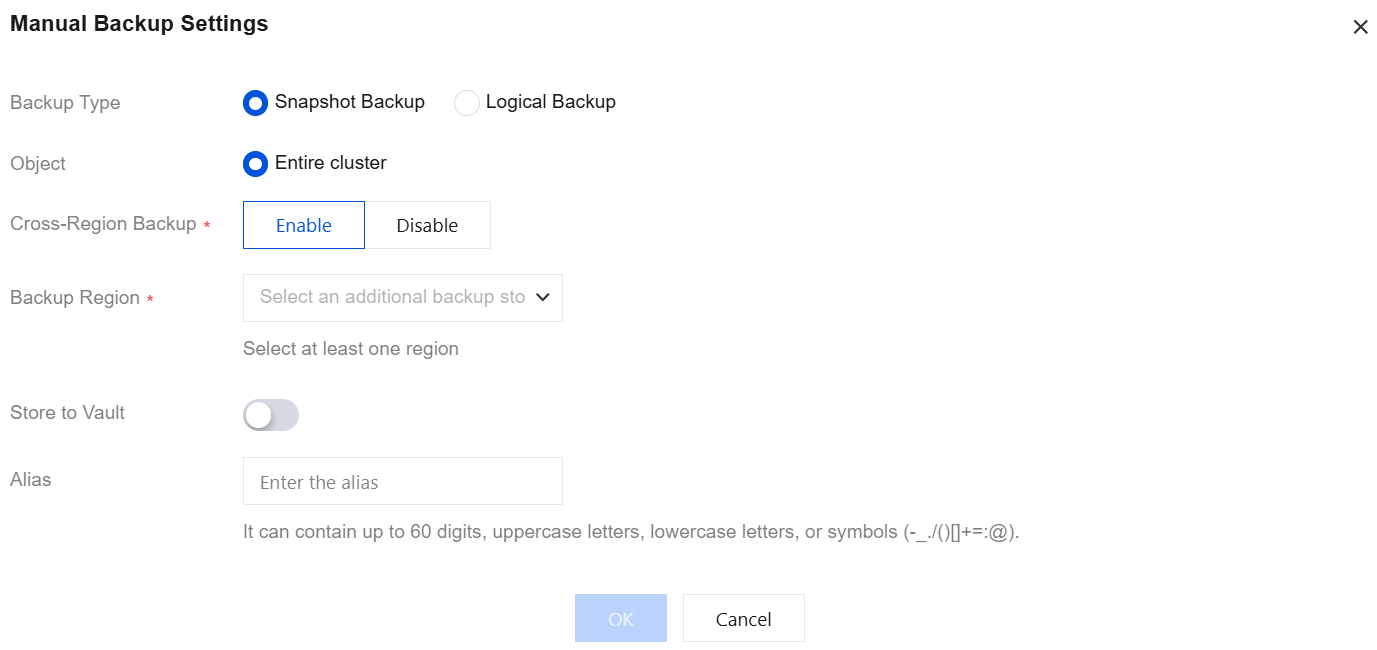
4. In the pop-up dialog box, complete the following configurations and click OK to create a backup task.
Parameter | Description |
Backup Type | Supports snapshot backup and logical backup. Attention: Logical backup may have a certain performance impact on the instance and affect database usage during manual backup. It is recommended to perform logical backup during off-peak hours. |
Object | Snapshot backups target the entire cluster, while logical backups support either the entire cluster or specified databases and tables. If you select specified databases and tables, you can choose specific databases and tables for manual backup. |
Cross-Region Backup | You can choose whether to enable cross-region backup for snapshot backups (for the entire cluster) and logical backups (for the entire cluster). If this is enabled, backup files can be saved to other regions. If not enabled, the retention region for manual logical backups defaults to the region where the current cluster resides. |
Backup Region | If cross-region backup is enabled, you can select up to three different regions to store the backup files. |
Store to Vault | If this option is enabled, manual backups will be delivered to the backup vault for storage. For details on the backup vault, see Backup Vaults. Note: Manual snapshot backups for the entire cluster, manual logical backups for the entire cluster, and manual logical backups for specified databases and tables all support the "Store to Vault" parameter. |
Select Vault | If "Store to Vault" is enabled, you can select the target backup vault for storage. |
Alias | When you create a manual backup, you can set an alias for the backup file. The alias can contain only digits, uppercase and lowercase letters, Chinese characters, and special characters (-_./()[]()+=:;@), with a maximum length of 60 characters. |
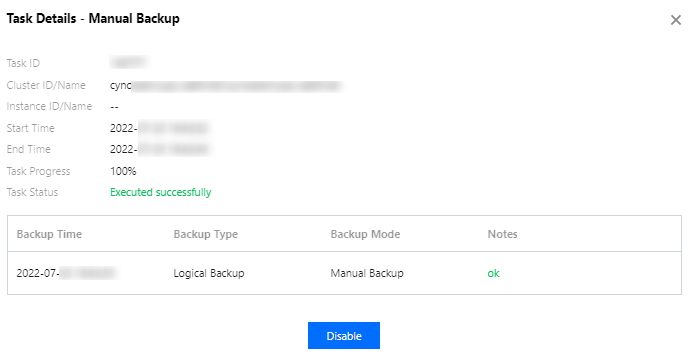
5. After creating a backup task, you can go to the Task List in the left sidebar to check the progress of the newly initiated backup task. Click Backup Details in the Operation column to view the specific execution details.
Related APIs
API | Description |
This interface (CreateBackup) is used to create a manual backup for a cluster. |
Help and Support
Was this page helpful?
You can also Contact sales or Submit a Ticket for help.
Help us improve! Rate your documentation experience in 5 mins.
Feedback