This document describes how to enable the database proxy in the TDSQL-C for MySQL console.
Database proxy is a network proxy service between the TencentDB service and the application service. It is used to proxy all requests when the application service accesses the database. It provides advanced features such as automatic read/write separation, connection pool, connection persistence, and consistency level configuration and boasts high availability, high performance, Ops support, and ease of use.
Notes
Database proxy currently is supported in the following regions:
Beijing (except Zones 1, 2, and III), Shanghai (except Zone 1), Guangzhou (except Zones 1 and 2), Chengdu, Chongqing, Nanjing, and Hong Kong (China) (except Zone 1).
Tokyo (except Zone 1), Virginia (except Zone 1), Silicon Valley (except Zone 1), Seoul (except Zone 1), Singapore (except Zone 1 and Zone 2), Bangkok Zone 2 and São Paulo Zone 1.
Database proxy currently is supported on the following versions: MySQL 5.7 (with kernel minor version 2.0.19 or later) and MySQL 8.0 (with kernel minor version 3.1.5 or later). If you upgrade the kernel minor version of the cluster, the associated read-write and read-only instances will be upgraded at the same time. For more information, see Upgrading Kernel Minor Version.
All versions of the read-only analysis engine support the database proxy.
Directions
1. Log in to the TDSQL-C for MySQL console. In the cluster list, click the ID or Manage in the Operation column of the target cluster to enter the cluster management page.
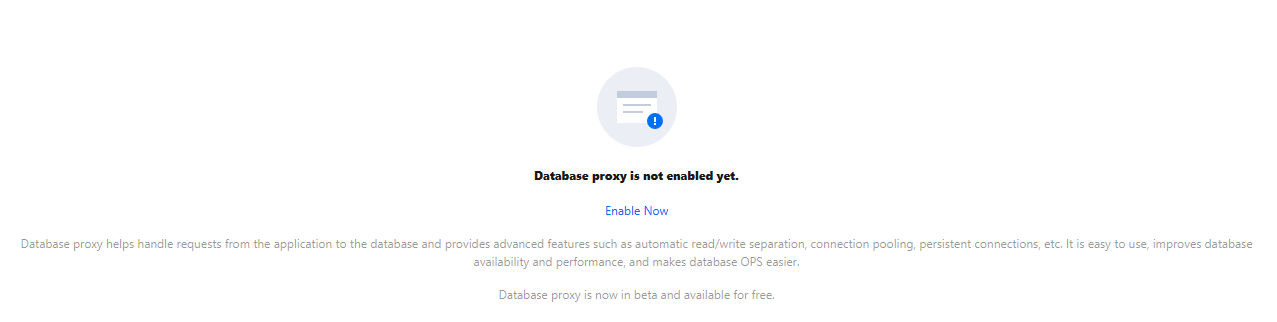
2. On the cluster management page, select the Database Proxy tab and click Enable Now.
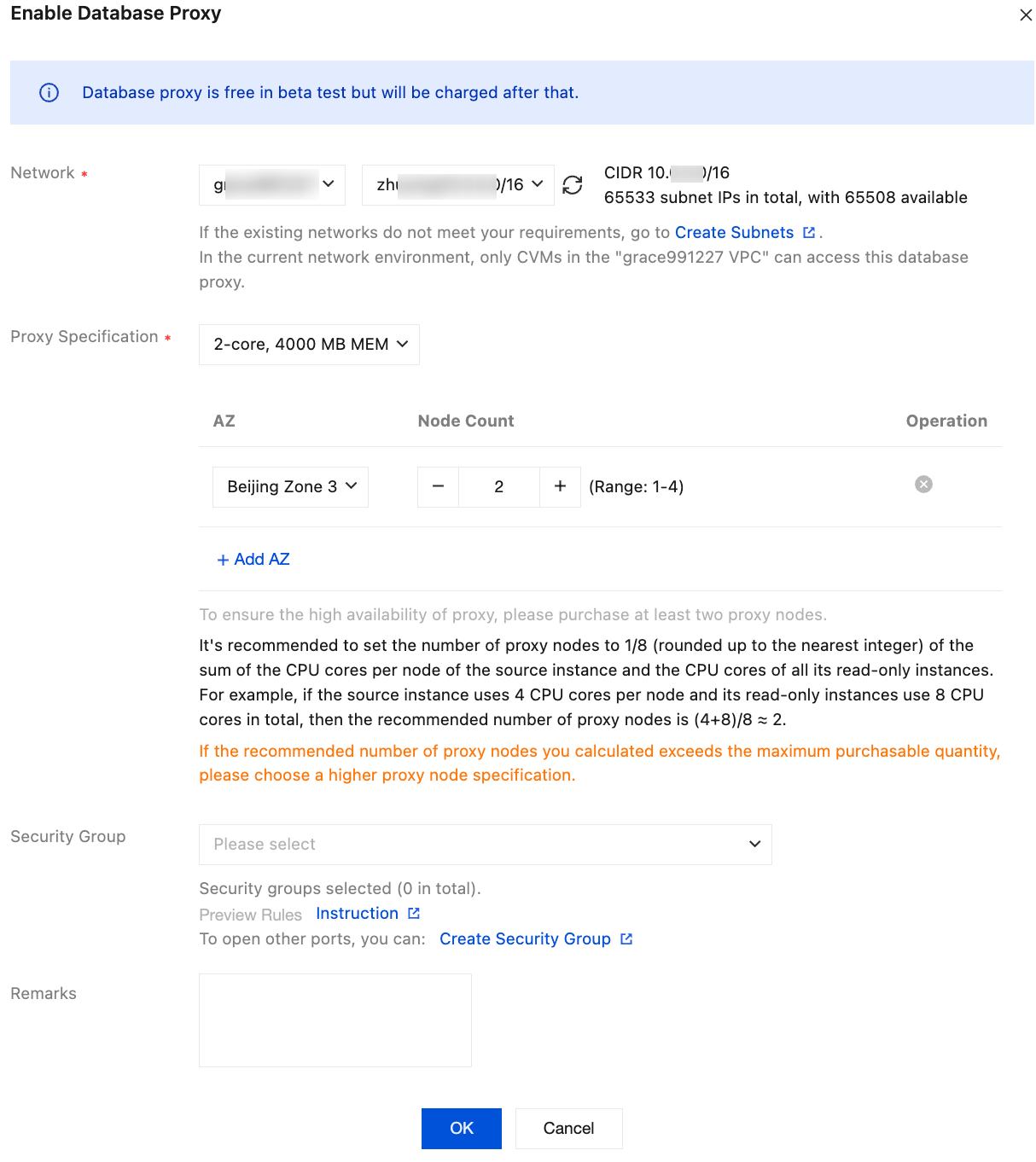
3. Complete the following configurations in the pop-up dialog box and click OK.
Parameter
Description
Network
Select a network for the database proxy. Only VPCs are supported.
Proxy Specification
Available specifications: 2-core 4,000 MB memory, 4-core 8,000 MB memory, and 8-core 16,000 MB memory.
AZ and Number of Nodes
Select an AZ for the database proxy. You can click the button to add more AZs. The number of available AZs here is subject to the number of available AZs in the current region.
Select the number of nodes. The calculation method for the recommended number of proxy nodes is related to the proxy specification.
If you select a proxy specification of 2-core and 4000 MB memory, the recommended number of proxy nodes is 1/8 of the sum of the CPU core of the primary instance and read-only instances, rounded up. For example, if the primary instance has 4 CPU core and the total compute power of the read-only instances is 8 CPU core, the recommended number of proxies = (4 + 8) / 8 ≈ 2.
If you select a proxy specification of 4-core and 8000 MB memory, the recommended number of proxy nodes is 1/16 of the sum of the CPU core of the primary instance and read-only instances, rounded up. For example, if the primary instance has 8 CPU core and the total compute power of the read-only instances is 16 CPU core, the recommended number of proxies = (8 + 16) / 16 ≈ 2.
If you select a proxy specification of 8-core and 16000 MB memory, the recommended number of proxy nodes is 1/32 of the sum of the CPU core of the primary instance and read-only instances, rounded up. For example, if the primary instance has 64 CPU core and the total compute power of the read-only instances is 64 CPU core, the recommended number of proxies = (64 + 64) / 32 ≈ 4.
If your cluster is in multi-AZ deployment mode, it is recommended that you configure the same number of database proxy nodes in both the primary and secondary AZs to ensure the high availability of the database proxy.
Note:
If the selected database proxy is not in the same AZ as the primary instance, write performance may degrade when the database proxy is used for connection.
If the recommended number of proxy nodes exceeds the limit for purchase, it is recommended that you select a higher specification.
Security Group
Select an existing security group or create one as needed.
Note:
You need to configure the security policy and allow the private network access port (3306 currently) to access the database proxy. For details, see Creating and Managing TencentDB Security Groups.
Remarks
Optional. Leave remarks for the database proxy service to be enabled.
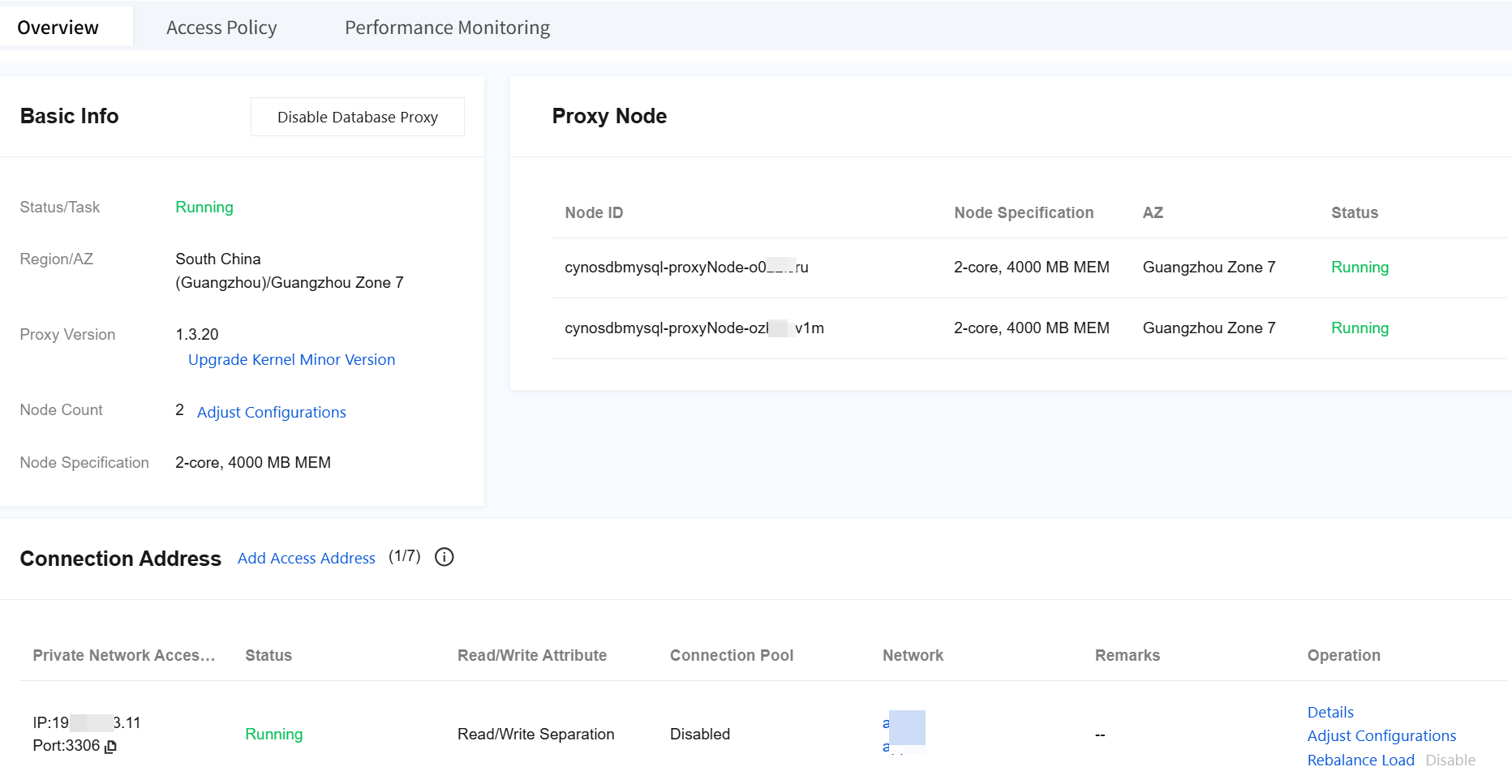
4. After successfully enabling the service, you can manage proxy nodes and view their basic information on the database proxy page. You can also modify the database proxy address and network type and add remarks in the
Note:
You can view Connections in the proxy node list or view the performance monitoring data of each proxy node to check whether the numbers of connections on the nodes are unbalanced, and if so, you can distribute the connections by clicking Rebalance Load.
Rebalance will cause proxy nodes to restart, and the service will become unavailable momentarily during the restart. We recommend you restart the service during off-peak hours. Make sure that your business has a reconnection mechanism.