Log shipping
Download
Focus Mode
Font Size
Prerequisites
The log delivery feature has been activated. For pricing details, see Billing Overview.
Role authorization has been completed.
A Tencent Cloud CKafka instance has been purchased, with bandwidth specifications configured according to actual log usage.
A ticket has been submitted to activate message queue CKafka to support environment routing. Submit a Ticket.
Directions
1. Log in to the BH console.
2. In the left sidebar, choose System Settings > Log delivery configuration.
3. If lLog delivery is not configured, you will be directed to the configuration page. If log delivery is already configured, click Reconfigure to enter the configuration page.
4. On the configuration page, configure the log delivery information:
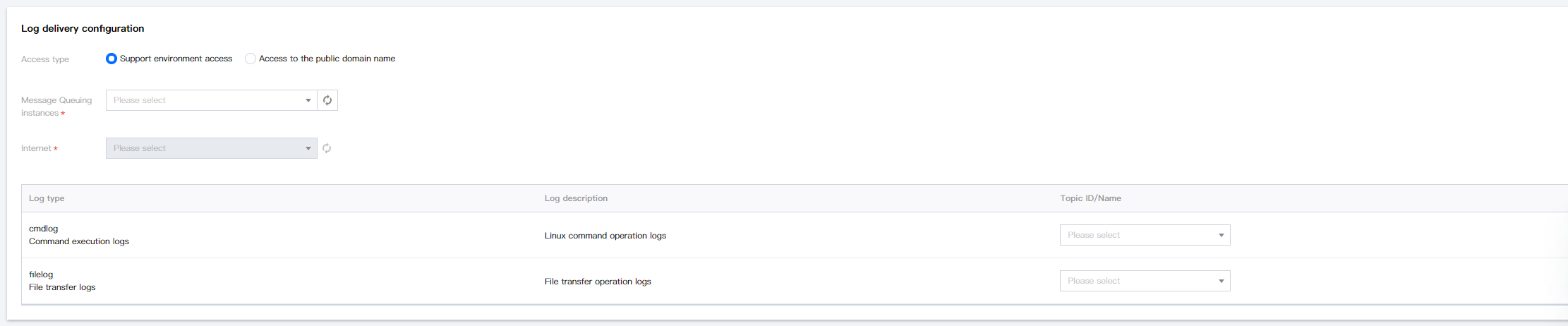
Parameter Name | Parameter Description |
Access type | Select the access method for the message queue. |
Message Queuing instances | Select the message queue instance for log shipping. |
Internet | Select the Internet. |
Username | Set the username. This is only required when using the public domain name access method. |
Password | Set the password. This is only required when using the public domain name access method. |
Topic ID/Name | Select the Topic for log shipping. |
5. After entering the parameters, click OK.
Help and Support
Was this page helpful?
You can also Contact sales or Submit a Ticket for help.
Help us improve! Rate your documentation experience in 5 mins.
Feedback