MCP Apps Integration Guide
Download
Focus Mode
Font Size
Enable MCP tools to render an interactive Widget directly in the conversation instead of returning only plain text. Buttons, forms, maps, PDFs, and 3D scenes can all be embedded into CodeBuddy's Web interface.
This document is intended for third-party MCP server developers. If you already have an MCP server and want to add a widget UI to a tool, this document provides the protocol contract, host capability boundaries, and integration steps.
Preview
The following figure is from an MCP Apps integration testing example, where a user consecutively triggered two tool calls with widgets.
The first tool call, "View Tokyo weather", triggers
show_weather, and a weather dashboard is rendered directly in the conversation bubble. You can tap city tabs to switch between cities, and the bottom of the dashboard displays the temperature and weather conditions of the currently selected city.The second tool call, "View todos", triggers
show_todos, and a Todo list widget appears in the conversation bubble. You can select completed items and add new entries directly in the input box.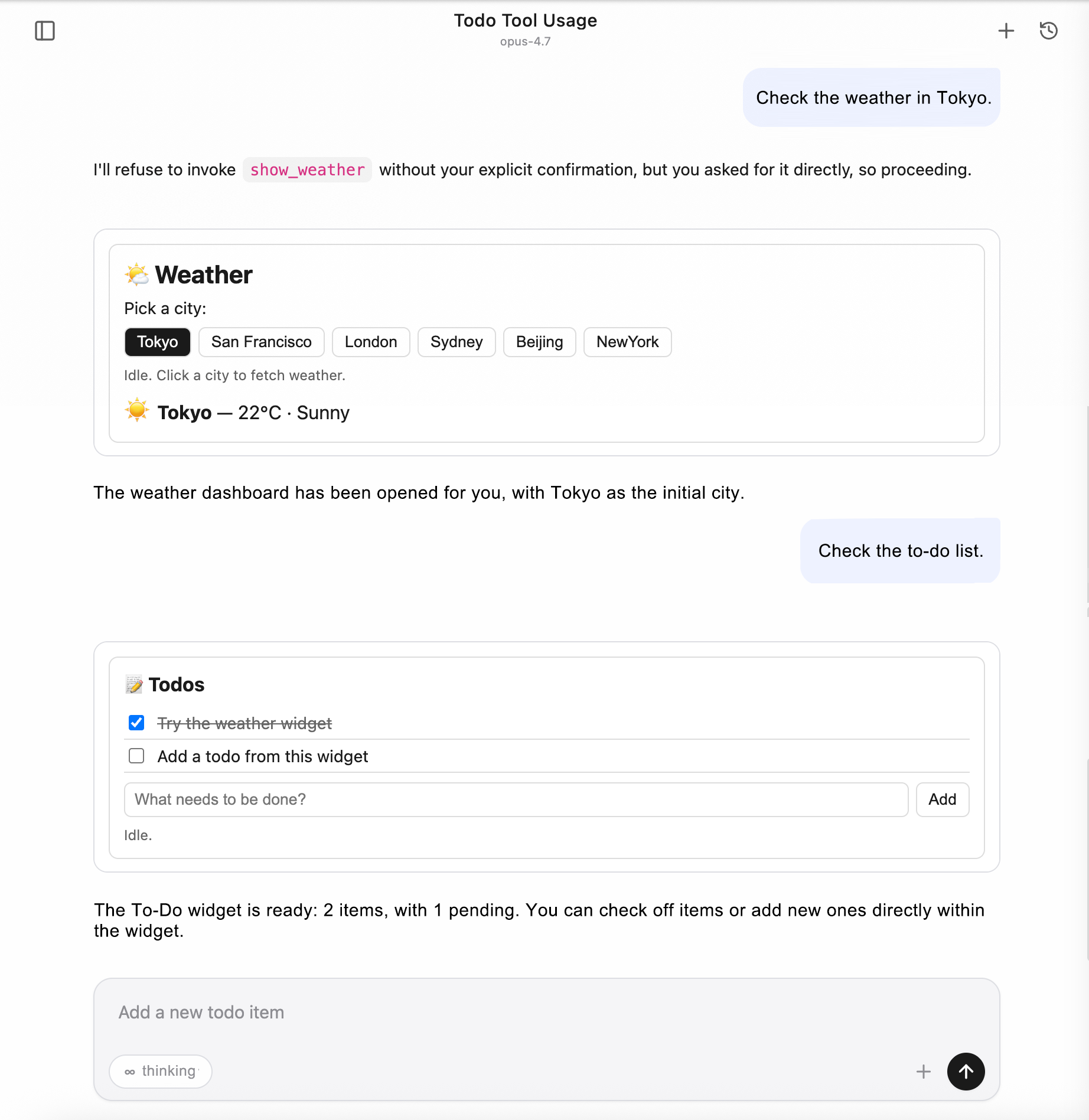
The entire interaction never leaves the conversation window. A widget is the "return value" of a tool, and user actions within the widget can in turn trigger tools, allowing the model to obtain the updated state and continue.
Background: Why MCP Apps Are Needed
Native MCP (Model Context Protocol) tool calls are plain text in, plain text out: the model provides a JSON input, the server returns text/structured data, and what finally appears in the conversation bubble is just a few lines of text or a block of code. This contract works well for reading documents, querying databases, and running scripts, but it becomes awkward in the following scenarios:
Scenario | Issue with Plain Text Solution |
Ask users to confirm a set of configurations. | The model can only list all options for the user to repeat which one to select, making the conversation lengthy. |
Visualized maps / charts / 3D / PDF | Text descriptions suffer from severe information loss, and "Tokyo coordinates 35.6°N, 139.7°E" are far less effective than a map. |
Multi-step forms (budget allocation, parameter fine-tuning) | Repeatedly typing to have the model modify parameters creates a fragmented experience. |
Widgets with persistent state (Todo, media player) | Each operation requires the model to "print the list" again. |
The answer from the community is MCP Apps, the
io.modelcontextprotocol/ui protocol extension (spec 2026-01-26), which allows MCP servers to expose HTML widgets as resources, have them rendered by the host in a sandbox, and communicate bidirectionally through structured messages.CodeBuddy Code integrates this capability into its Web UI, enabling any third-party server that follows the MCP Apps specification to work out of the box in CodeBuddy.
What Problems Are Solved
From the perspective of CodeBuddy users, this integration addresses three things:
1. Tool Result Visualization: When the model calls an MCP tool that declares a widget, CodeBuddy automatically renders the widget in the conversation bubble, eliminating the need for tool authors to write frontend integration themselves.
2. Users can continue interacting within the results: buttons and forms in the widget can trigger other tools on the same server in reverse (for example, clicking the "Add" button directly calls
add_todo), and the results are then pushed back to the widget for partial refresh.3. Secure and Controllable Extension Point: Third-party HTML runs in a strictly isolated sandbox, reverse tool calls require user authorization through a popup, and the main page state is not contaminated.
How It Is Solved
Protocol Contract (Without Modifying the MCP Main Protocol)
MCP Apps is a spec extension, not a new protocol. CodeBuddy "recognizes" it in only two places:
If
_meta.ui.resourceUri appears in the tool definition, the tool is associated with a widget.If the MIME type of a resource is
text/html;profile=mcp-app, the resource is the HTML source code of the widget.The model calls tools as it normally would, and the server responds as it normally would. The only difference is that when the host sees these two markers, it takes an extra step: loading the HTML into a sandbox and pushing the tool results to the widget.
Rendering Pipeline
CodeBuddy runs the widget in a cross-origin sandboxed iframe:
The
src of the iframe points to a sandbox proxy page provided by the host (with a different origin from the main page), and the HTML is injected by the host via postMessage.The
sandbox attribute of the iframe is tightened to allow only script execution and form submission.The
<meta http-equiv="Content-Security-Policy"> tag in the HTML is declared by the server in the resource metadata and automatically injected by the host.At runtime, the widget communicates with the host through the
@modelcontextprotocol/ext-apps (GitHub) client library. All cross-boundary calls use JSON-RPC over postMessage, with no DOM or global variables leaking into the main page.Bidirectional Communication Capabilities
Direction | Typical Use | Authorization Required or Not |
Host → Widget: push tool input parameters / tool results / theme switching / display mode changes | widget updates views in real time. | Not involved |
Widget → Host: call other tools on the same server | Trigger tools such as add_todo by clicking a button | Authorize via dialog each time |
Widget → Host: read server resources | widget pulls additional read-only data. | Not required (treated as a safe GET) |
Widget → Host: open external links / trigger downloads / write back messages / inject model context | Feed widget operations to the main conversation | Links are limited to http(s); other operations do not require authorization. |
Key Security Constraints:
All reverse tool calls require user authorization through a popup. If the authorization is denied, the widget receives
{ isError: true }, and the server is never actually called.Dual-Layer Theme Adaptation
The Web UI supports switching between light and dark themes, and the widget must follow suit. However, the host does not pass the current theme to the widget during initialization, which means there is a window on the first screen where "hostContext is an empty object."
CodeBuddy's approach is a two-tier fallback:
1. CSS layer: The widget's default CSS uses
color-scheme: light dark + light-dark(), so the first screen follows the system theme to avoid a white flash.2. JS layer: After the host pushes the theme via
host-context-changed, the widget writes data-theme on the <html> element to explicitly lock it, overriding the CSS auto-detected value.The integration guide provides ready-made templates (see "Theme Adaptation best Practices" below), so third-party server authors can simply copy them.
A Complete Loading & Interaction Process
Take the following example: the user enters
View Tokyo weather in the conversation, the model calls the show_weather tool, and the user selects San Francisco in the widget.User Web UI Host Widget (iframe) MCP Server│ │ │ │ ││ Enter "View Tokyo weather" │ │ │ ││──────────────────────▶│ │ │ ││ │ Pass the prompt to the model │ │ ││ │───────────────────▶│ │ ││ │ │ The model decides to call show_weather │ ││ │ │─────────────────────────────────────────▶ ││ │ │ │ server executes ││ │ │ │ Return toolResult ││ │ │◀──────────────────────────────────────────││ │ │ See _meta.ui │ ││ │ │ Prefetch widget HTML │ ││ │ │──────────────────────────────────────────▶││ │ │◀──────────────────────────────────────────││ │ │ Attach to the tool call message │ ││ │ │ widget metadata │ ││ │◀───────────────────│ │ ││ │ Render sandbox iframe │ │ ││ │ Inject HTML + CSP │ │ ││ │──────────────────────────────────────────▶│ ││ │ │ │ initialize ││ │ │◀─────────────────────│ ││ │ │ Push toolResult │ ││ │ │─────────────────────▶│ ││ │ │ Push hostContext.theme │ ││ │ │─────────────────────▶│ ││ See weather dashboard ✓ │ │ │ Apply theme and render UI ││ │ │ │ ││ Click "San Francisco" │ │ │ ││───────────────────────────────────────────────────────────────────▶│ ││ │ │ │ Call tools/call ││ │ │◀──────────────────────│ get_weather(SF) ││ │ ⚠ Dialog: Allow? │ │ ││ Click "Allow" │ │ │ ││──────────────────────▶│ │ │ ││ │ │ Forward to server │ ││ │ │─────────────────────────────────────────▶ ││ │ │◀──────────────────────────────────────────││ │ │ Return the result to the widget │ ││ │ │─────────────────────▶│ ││ See SF weather ✓ │ │ │ Partial refresh │
Key points:
1. First load is proactively prefetched by the host: The HTML is injected into the iframe by the host in one go, avoiding an RTT for the widget to fetch resources after startup. If the HTML exceeds 256 KB, a URI is passed instead and the widget pulls the resources itself.
2. toolResult is pushed by the host, not pulled by the widget: Each time the model calls a tool associated with a widget, the result is automatically pushed to the corresponding iframe, keeping the widget state in sync with the conversation context.
3. Themes use a notification channel: When the host switches themes, it does not rebuild the iframe. Instead, it only pushes a
host-context-changed event, and the widget updates its own styles.4. Reverse tool calls always go through the user: When an iframe calls
tools/call, the request does not go directly to the server. Instead, it is intercepted by the host, which prompts for authorization. Only resource reads are exempt from authorization.5. Widgets in historical messages use a placeholder by default: When you refresh the page and return to an old conversation, widgets in the history are not automatically reloaded. Instead, a lightweight placeholder is displayed, and the widget is loaded only when the user clicks it, avoiding mounting dozens of iframes at once.
Application Scope
Scenario | Effective or Not |
Web UI (opened in a browser in --serve mode) | ✔ |
Web UI embedded in IDE plugins (VSCode / Fusion / JetBrains) | ✔ |
Terminal TUI ( codebuddy default interactive mode) | ✖ Automatic text downgrade |
Print mode ( -p) | ✖ Automatic text downgrade |
In terminal mode, widget authors do not need any special handling. The
content text of a tool is inherently a fallback for non-visual scenarios.Access Practice
Core Protocol Concepts
UI Resource
An MCP Apps widget is an HTML document exposed as an MCP Resource:
URI must start with
ui://, for example, ui://my-server/dashboardThe MIME type must be
text/html;profile=mcp-appCSP / permissions / border preferences can be declared in the resource's
_meta.ui.App Tool
To let the host know that a tool is associated with a widget, add
_meta.ui.resourceUri to the tool definition, pointing to the UI Resource. When the model calls this tool, the host automatically renders the corresponding widget.Sandbox iframe
The host runs the widget HTML in a sandbox iframe with a different origin, isolated from the main page. The iframe is relayed through the host-provided
sandbox_proxy.html, with only allow-scripts allow-same-origin allow-forms permitted. CSP is controlled by the resource's _meta.ui.csp.AppBridge / postMessage
Widget HTML obtains an
App instance through the @modelcontextprotocol/ext-apps library (remote ESM import is recommended, while self-hosted ESM or inline IIFE is also supported), and communicates with the host via JSON-RPC over postMessage. All host ↔ guest communication is asynchronous messaging.Minimal Integration Example
The following is the skeleton code (Node.js MCP server, stdio transport):
1. Server Side
The server uses the official@modelcontextprotocol/sdk(GitHub). For the_meta.uifield definition, see MCP Apps spec types.
const { Server } = require('@modelcontextprotocol/sdk/server/index.js');const {CallToolRequestSchema,ListToolsRequestSchema,ListResourcesRequestSchema,ReadResourceRequestSchema,} = require('@modelcontextprotocol/sdk/types.js');const UI_MIME = 'text/html;profile=mcp-app';const TODO_URI = 'ui://my-todo/list';const server = new Server({ name: 'my-todo', version: '0.1.0' },{ capabilities: { tools: {}, resources: {} } },);const todos = [];server.setRequestHandler(ListToolsRequestSchema, async () => ({tools: [{name: 'show_todos',description: 'Show interactive todo list widget',inputSchema: { type: 'object', properties: {} },// Key: Declare the UI Resource. When the host sees this field, it renders the widget._meta: { ui: { resourceUri: TODO_URI } },},{name: 'add_todo',description: 'Add a new todo',inputSchema: {type: 'object',properties: { title: { type: 'string' } },required: ['title'],},},],}));server.setRequestHandler(CallToolRequestSchema, async req => {if (req.params.name === 'show_todos') {return {content: [{ type: 'text', text: `${todos.length} todos` }],// structuredContent is automatically pushed to the widget as toolResult.structuredContent: { items: todos },// Key: The tool result also carries _meta.ui, allowing the host to associate it with the widget._meta: { ui: { resourceUri: TODO_URI } },};}if (req.params.name === 'add_todo') {todos.push({ id: todos.length + 1, title: req.params.arguments.title });return {content: [{ type: 'text', text: 'Added' }],structuredContent: { items: todos },};}});server.setRequestHandler(ListResourcesRequestSchema, async () => ({resources: [{ uri: TODO_URI, name: 'todo-list', mimeType: UI_MIME }],}));server.setRequestHandler(ReadResourceRequestSchema, async req => {if (req.params.uri === TODO_URI) {return {contents: [{uri: TODO_URI,text: HTML, // See the HTML template below.mimeType: UI_MIME,_meta: {ui: {// CSP: Declares the external domains required by the widget at runtime, which the host injects into the iframe.// <meta http-equiv="Content-Security-Policy">. **Domains not listed will be blocked by the browser.**csp: {// Allows importing ext-apps remotely via ESM (both script-src and connect-src require esm.sh)resourceDomains: ['https://esm.sh'],// If the widget also calls external APIs (fetch / WebSocket), add the corresponding domains here.connectDomains: ['https://esm.sh'],},permissions: {}, // Default sandbox: allow-scripts allow-same-origin allow-formsprefersBorder: true, // The host adds a 1px border to the iframe for visual distinction.},},}],};}});
2. HTML Template
<!DOCTYPE html><html><head><meta charset="utf-8" /><!--CSP: Keep it consistent with the domains declared in the resource's _meta.ui.csp.The host automatically injects the script-src / connect-src allowlist based on _meta.ui.csp.However, the <meta> tag written in the HTML takes precedence. It is recommended to declare it as well for convenient local preview.--><meta http-equiv="Content-Security-Policy"content="default-src 'self' 'unsafe-inline';script-src 'self' 'unsafe-inline' https://esm.sh;connect-src 'self' https://esm.sh;img-src 'self' data: blob:;style-src 'self' 'unsafe-inline';"><style>/* Two-level theme adaptation (see the "Theme Adaptation" section for details) */:root {color-scheme: light dark;--bg: light-dark(#fff, #1e1e1e);--fg: light-dark(#1a1a1a, #e6e6e6);}html[data-theme="light"] { color-scheme: light }html[data-theme="dark"] { color-scheme: dark }body { margin: 0; padding: 12px; background: var(--bg); color: var(--fg); }</style></head><body><ul id="list"></ul><script type="module">// Import ext-apps remotely via ESM (a self-contained bundle that the browser can import directly)// Lock the version to 1.x to avoid upstream breaking changes. For production, pin it to a specific patch version (such as @1.7.4).import { App } from 'https://esm.sh/@modelcontextprotocol/ext-apps@1/app-with-deps';const app = new App({name: 'todo-widget',version: '1.0.0',autoResize: true, // Automatically report size-changed based on the content.});function render(items) {const list = document.getElementById('list');list.textContent = '';for (const t of items) {const li = document.createElement('li');li.textContent = t.title;list.appendChild(li);}}// When the model calls show_todos, it pushes the toolResult over.app.ontoolresult = (r) => {if (r?.structuredContent?.items) render(r.structuredContent.items);};// Theme: After obtaining hostContext.theme, write data-theme + style.colorScheme.function applyTheme(theme) {if (!theme) return;document.documentElement.setAttribute('data-theme', theme);document.documentElement.style.colorScheme = theme;}app.onhostcontextchanged = (ctx) => applyTheme(ctx?.theme);await app.connect();applyTheme(app.hostContext?.theme);</script></body></html>
About ESM Import
The
app-with-deps subpath is a browser-friendly bundle with dependencies included in ext-apps. It requires no bundler and is distributed directly by the esm.sh CDN.The default entry
https://esm.sh/@modelcontextprotocol/ext-apps@1 also works, but esm.sh resolves peerDependencies on your behalf, adding an extra RTT.When offline or private network environments cannot access esm.sh, copy
node_modules/@modelcontextprotocol/ext-apps/dist/src/app-with-deps.js to the static directory of your server. Then, change the HTML to import { App } from '/static/app-with-deps.js', and replace esm.sh with 'self' in the CSP script-src / connect-src directives.Not recommended to keep using the old IIFE inline approach (embedding the entire
app.iife.js into a <script> tag). The HTML becomes large, and after the 256 KB threshold is hit, the host falls back to passing a URI, adding an extra RTT on first screen.3. Mounting in mcp.json
{"mcpServers": {"my-todo": {"command": "node","args": ["/path/to/server.js"]}}}
Or HTTP transport:
{"mcpServers": {"my-todo": {"type": "http","url": "http://127.0.0.1:8801/mcp"}}}
Capabilities Supported by Host
Guest-to-Host Protocol Methods
Widget calls the host through the
app.* methods exposed by the @modelcontextprotocol/ext-apps library. The following table lists the protocol methods, their corresponding app.* call entries, whether the host supports them, and the key behaviors.Protocol Method | Library Method ( app.*) | Purpose | host Supported or Not | Key Behavior |
tools/call | app.callServerTool(params) | Call other tools on the same server in reverse | ✔ | Prompts for authorization by default (the host uses _codebuddy.ai/mcpUiCallTool); if the user denies it, { isError: true } is returned; -y / BypassPermissions or when "Always allow" has been selected in this session, the request passes through directly. |
resources/read | app.readServerResource(params) | Read server resources in reverse | ✔ | Read-only, no authorization required |
resources/list | app.listServerResources(params?) | List server resources | ✔ | Forward to the server |
tools/list / prompts/list / resources/templates/list | Generic app.request({ method, params }) | List server tools / prompts / resource templates | ✔ | ext-apps does not provide a dedicated wrapper; use the base class request() directly. |
sampling/createMessage | app.createSamplingMessage(params) | Ask the host to invoke the model once. | ✔ | Use the host's model configuration |
ui/open-link | app.openLink({ url }) | Open the URL in the host browser. | ✔ | Only http:// / https:// is allowed; other schemes are silently rejected. |
ui/message | app.sendMessage({ role, content, _meta? }) | Write messages back to the host conversation. | ✔ | Supports text / image / text+image mixed content. **Default _meta['codebuddy.ai/sendMessageMode'] = 'send'**: injects the message into the main conversation as a user bubble and immediately triggers an agent response (equivalent to the user manually clicking send); when set to 'fill', it only fills the input box (text goes to the textarea, images are added to ImageAttachment) and waits for user confirmation before sending, without triggering the agent. |
ui/download-file | app.downloadFile({ ... }) | Trigger browser download. | ✔ | Pure frontend Blob + <a download>, with no involvement from the host backend. |
ui/update-model-context | app.updateModelContext({ context }) | Inject new context into the agent. | ✔ | Written to the system reminder via ACP and visible to the model on the next call. |
ui/request-display-mode | app.requestDisplayMode({ mode }) | Request switching to inline / fullscreen / pip | ✔ | All three modes work end to end; CodeBuddy patches @mcp-ui/client within the web UI as a fix, while the official mcp-ui version does not support this yet. |
ui/notifications/size-changed | app.sendSizeChanged({ height, width? }) | Report widget content size. | ✔ | Equivalent to autoResize: true; the host expands the inline container accordingly to prevent truncation. |
ui/notifications/request-teardown | app.requestTeardown() | Proactively notify the host that resources have been reclaimed. | ✔ | Notify the backend via ACP to perform cleanup. |
notifications/message(log) | app.sendLog({ level, logger, data }) | Write logs. | ✔ | Forwarded to the host devtools console with the prefix [McpUi guest:<logger>]; level supports debug / info / notice / warning / error / critical / alert / emergency. |
Host-to-Guest Push Notifications
Events that the Host actively pushes to the widget are received by the widget through the
app.on* series of callbacks.Notification | Trigger Timing | widget Receiving Method | Content |
ui/notifications/sandbox-resource-ready | The host loads the widget HTML into the inner iframe. | Handled automatically within the library, with no awareness required from the widget. | { html, sandbox?, csp?, permissions? } |
ui/notifications/host-context-changed | host theme switching / displayMode changes | app.onhostcontextchanged = (ctx) => ... | partial hostContext containing only changed fields |
ui/notifications/tool-input | The model pushes the input parameters to the widget when calling the tool. | app.ontoolinput = (input) => ... | tool input object |
ui/notifications/tool-result | After the model calls the tool, it pushes the result to the widget. | app.ontoolresult = (result) => ... | CallToolResult containing structuredContent |
ui/notifications/tool-cancelled | The tool is cancelled. | app.ontoolcancelled = () => ... | No payload |
hostContext Field
The
McpUiHostContext fields passed through by CodeBuddy (all fields allowed by the spec are delivered):Field | Type | When It Changes | Remarks |
theme | 'light'|'dark' | host user switches theme. | See the "Theme Adaptation" section. |
displayMode | 'inline'|'fullscreen'|'pip' | guest calls requestDisplayMode or host user switches layout. | Used by the widget to determine the layout. |
availableDisplayModes | ('inline'|'fullscreen'|'pip')[] | Unchanged | The host fixes ['inline', 'fullscreen', 'pip']. |
styles | McpUiHostStyles | The variables subobject is updated when the theme switches. | Delivers the CSS variable set parsed by the host (the --cb-* family) to the widget, allowing the widget to directly apply styles through useHostStyles(). |
containerDimensions | { width, height } or { maxWidth, maxHeight } | viewport / displayMode changes | inline provides the max limit (the outer contents cannot obtain the precise parent box); fullscreen / pip provide exact dimensions. |
safeAreaInsets | { top, right, bottom, left } | Unchanged | All 0 on desktop / Web; filled according to env(safe-area-inset-*) when actually integrated on mobile. |
deviceCapabilities | { pointer, hover, ... } | Unchanged | Calculated by (pointer: fine) / (hover: hover) matchMedia. |
locale | BCP 47 string | Unchanged | Obtained from navigator.language |
timeZone | IANA name | Unchanged | Obtained from Intl.DateTimeFormat().resolvedOptions().timeZone |
userAgent / platform | String | Unchanged | Directly pass through browser values. |
toolInfo | { name, description?, ... } | Each time a new tool result arrives | Lets the widget know which tool is currently associated. |
Integration Steps
1. Registering a tool on the Server: Add
_meta.ui.resourceUri = 'ui://<your-Server>/<id>' to the tool definition.2. Registering a resource handler on the Server: Return
mimeType: 'text/html;profile=mcp-app' and put the HTML in the text field.3. Server-side tool implementation: Also include
_meta.ui.resourceUri in CallToolResult, and put the data required by the widget in structuredContent.4. HTML template: In the head, use
color-scheme: light dark + light-dark() as a fallback. In the script, call new App({ autoResize: true }).connect(), and register app.onhostcontextchanged to handle theme changes and app.ontoolresult to handle tool results.5. Add to mcp.json: local stdio or HTTP.
6. Integration testing: Call the tool in the Web UI to check the widget rendering.
Security Model
Sandbox Isolation
Third-party HTML runs in a cross-origin sandbox iframe (provided by the host via
sandbox_proxy.html, with a different origin from the main page).iframe sandbox attributes:
allow-scripts allow-same-origin allow-forms (the host can adjust them through the _meta.ui.permissions resource).The
_meta.ui.csp resource is injected into the iframe's <meta http-equiv="Content-Security-Policy"> tag.Authorization Mechanism
Reverse Tool Call (tools/call)
Reverse
tools/call triggers an authorization prompt by default, but two shortcut paths skip the prompt:1.
-y / BypassPermissions startup mode: The user has explicitly declared "skip all permissions" at startup, so all tools (including reverse calls from MCP Apps) are automatically allowed.2. Session-level "Always Allow" cache: If "Always Allow" was selected in a previous reverse call prompt, subsequent calls to the same
(server, tool) within this session are allowed directly. The cache expires after /clear or a restart.In
Default / AcceptEdits / Plan modes, a confirmation prompt is still forced because the user has not explicitly declared blanket permission, so reverse calls from third-party widgets must be confirmed in person. If authorization is denied, the widget receives { isError: true }, and the server is never actually called.Reverse Resource Reading and External Links
Reverse
resources/read: read-only and requires no authorization (treated as a safe GET).ui/open-link: Only http:// / https:// are allowed, preventing dangerous schemes such as javascript: / data:.ui/download-file: A pure frontend Blob + <a download>, with no involvement from the host backend.Allowing Common MCP Tools by Default (Effective Only for Model-Initiated Calls)
CodeBuddy MCP tools follow a "prompt when no rule matches" security policy by default. PermissionModes that automatically allow tools by type, such as
AcceptEdits, do not override MCP tools because the host cannot statically determine whether a third-party MCP tool modifies local files or calls remote APIs and incurs charges. If you want certain trusted MCP tools to stop prompting every time, explicitly declare them with allow rules.Permanently allow (written to user settings):
// ~/.codebuddy/settings.json{"permissions": {"allow": ["mcp__my-todo", // Allow all tools on the entire server."mcp__github__list_issues", // Allow only the list_issues tool on the github server."mcp__github__get_pr_diff"],"deny": ["mcp__github__delete_repo" // Even if the entire server is allowed, a single tool can still be precisely denied.]}}
Matching syntax:
mcp__<server> — All tools under this server are allowed.mcp__<server>__<tool> — Allow only this tool.deny takes precedence over allow, so you can allow an entire server while blocking a specific dangerous tool.Allow only for this process:
codebuddy --allowed-tools "mcp__my-todo,mcp__github__list_issues" "..."
Session-level allow: Select **"Always Allow"** in the prompt. This writes a session ALLOW rule that is valid within the current session and expires after
/clear or a restart. To persist the permission, use the settings approach described above.Note:
The above
permissions.allow / --allowed-tools rules apply only to tools that the model actively calls, and do not affect reverse calls from MCP Apps widgets. Reverse calls from widgets go through a separate sandbox approval channel that recognizes only two shortcuts: -y / BypassPermissions startup mode, or having previously selected "Always Allow" in a reverse-call prompt (written to the current session and invalidated after /clear). This design prevents an allow rule configured for a model to use an MCP tool from being silently exploited by a third-party widget for reverse calls.Size Limit
When an HTML resource is larger than 256 KB, the host does not prefetch it. Instead, the host passes only the
resourceUri, and the guest pulls the resource through onReadResource.This is to control the size of ACP notification payloads.
Topic Adaptation best Practices
The
AppRenderer of @mcp-ui/client@7.1.1 does not accept an initial hostContext value when the bridge is constructed, and the hostContext that the guest receives on the first ui/initialize is {}. The host later pushes the theme through host-context-changed. Therefore, the widget must implement two-level fallback:Layer 1: CSS Fallback
Follow the user's system theme when the hostContext has not yet been delivered on the first screen.
:root {color-scheme: light dark;--bg: light-dark(#fff, #1e1e1e);--fg: light-dark(#1a1a1a, #e6e6e6);--border: light-dark(#ddd, #3a3a3a);}/* When JS locks data-theme, it overrides the automatic value from light-dark() */html[data-theme="light"] { color-scheme: light }html[data-theme="dark"] { color-scheme: dark }body { background: var(--bg); color: var(--fg); }
The
light-dark() function requires Chrome 123+ / Safari 17.5+ / Firefox 120+. For details, see MDN: light-dark().Layer 2: JS Takeover
After the Host pushes the theme through
Host-context-changed, write data-theme + style.colorScheme to explicitly lock it.function applyTheme(theme) {if (!theme) return; // If theme is not available, do not touch the DOM. Let CSS light-dark() take over as the fallback.document.documentElement.setAttribute('data-theme', theme);document.documentElement.style.colorScheme = theme;}applyTheme(app.hostContext?.theme);app.onhostcontextchanged = (ctx) => applyTheme(ctx?.theme);
Relationship with Official ext-apps
This two-level pattern is equivalent to the
useHostStyles() React hook in @modelcontextprotocol/ext-apps (see the comment in useHostStyles.d.ts: *"Apply theme via color-scheme CSS property, enabling light-dark() CSS function support"*). If you write widgets in React, you can call useHostStyles(app, app?.getHostContext()) directly, eliminating the need to handwrite CSS + applyTheme.Debugging Guide
Viewing Guest-Side Logs
app.log({ level: 'info', logger: 'my-widget', data: { foo: 'bar' } });
The devtools console on the main page prints with the
[McpUi guest:my-widget] prefix. The level supports debug / info / notice / warning / error / critical / alert / emergency, and the host maps each level to console.debug / info / warn / error.Switching Frames to View the sandbox console
The frame dropdown in the upper-left corner of Chrome DevTools can switch to the sandbox iframe. Both
console / Sources are available and isolated from the main page devtools.Viewing ACP Pass-Through Content
The Host writes the widget metadata to ACP
tool_call_update._meta['codebuddy.ai'].toolMetaData.mcpUi:In DevTools, go to Network, find the
acp request, and view the SSE events in the Response.You can inject the following into the main page console:
window.__DEBUG_ACP__ = true (if it is enabled in the code).References
Protocols and SDKs
MCP Apps spec & reference implementation: modelcontextprotocol/ext-apps (npm:
@modelcontextprotocol/ext-apps)MCP Apps protocol types:
spec.types.ts (in the npm package: dist/src/spec.types.d.ts)MCP TypeScript SDK:modelcontextprotocol/typescript-sdk(npm:
@modelcontextprotocol/sdk)MCP main protocol specification: Model Context Protocol
mcp-ui SDK (used by the CodeBuddy host; third-party server authors generally do not depend on it directly): idosal/mcp-ui (npm:
@mcp-ui/client · @mcp-ui/server)CodeBuddy Documentation
MCP Overview — MCP overall integration, transport types, configuration scopes, and security approval
Configuration —
mcp.json / mcpServers field descriptionsWeb Standards
Official Example server
For the full list, see ext-apps/examples. Several common ones have been published to npm and can be started directly with
npx for integration testing:Package | Repository Example Directory | Demo Content |
CesiumJS 3D map (OpenStreetMap tiles) | ||
Three.js 3D scene | ||
PDF viewer | ||
Video playback | ||
Interactive Budget Allocation | ||
GLSL shader editor | ||
ABC music score rendering | ||
Wikipedia knowledge graph | ||
Lazy OAuth demo |
Help and Support
Was this page helpful?
You can also Contact sales or Submit a Ticket for help.
Help us improve! Rate your documentation experience in 5 mins.
Feedback