After you add and configure a domain name in the CDN console, we recommend that you test the connection by using the following method.
1. Check the CNAME domain, www.qcdntest.cn.cdn.dnsv1.com.cn
2. Obtain the cache node IP.
Open a command window and run the following command. The returned IP address is the IP address of the CDN acceleration node.
ping www.qcdntest.cn.cdn.dnsv1.com.cn
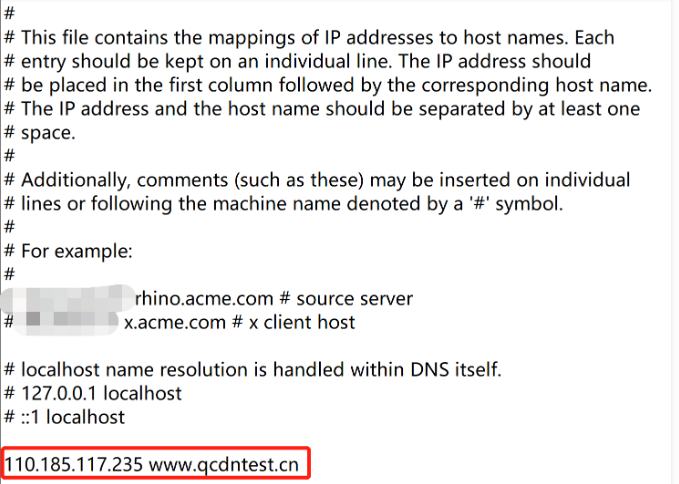
3. Configure the `hosts` file.
Add the CDN cache node IP (110.185.117.235) and the accelerated domain name (www.qcdntest.cn) obtained in Step 2 to your local hosts file in the format of “110.185.117.235 www.qcdntest.cn”.
On Windows, the hosts file is stored in this directory: C:\\Windows\\System32\\drivers\\etc. The following figure shows an example:
On macOS, open the command window, enter sudo vi /etc/hosts, press the Enter key, enter the password, and press the Enter key again. After you open the hosts file, enter i to start editing the file. The content and format are the same as instructed for Windows users.
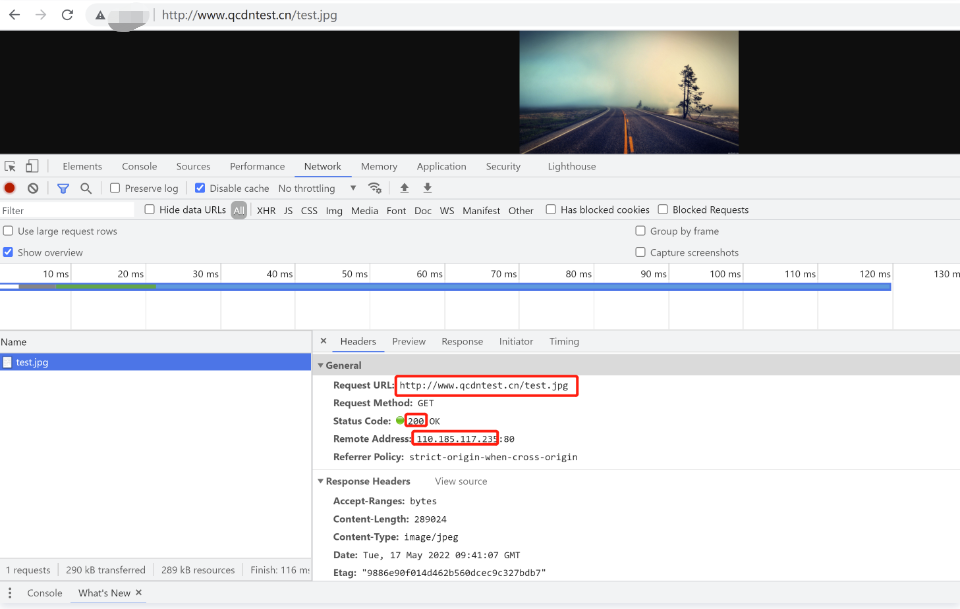
4. Access the domain name. If the response is the same as that of the origin server, the access succeeds.