Issue Clustering Configuration
Download
Focus Mode
Font Size
This document describes the rules for configuring issues on the platform and for platform Issue clustering.
Platform Issue Clustering Rules
The platform performs clustering based on the stack features and exception types from crash reporting, grouping stacks with the same features under the same exception type into a single Issue. Therefore, the key to clustering is how to obtain the key stack. By default, the platform starts from the top of the stack and extracts three business frames as the feature stack. For example, consider the following stack:
1 AudioToolbox 0x00000001d0b18f74 std::__1::unique_ptr<AQClientBuffer, AQ::API::BufferDeleter>::reset[abi:v160006](AQClientBuffer*) + 14522 AudioToolbox 0x00000001d0bab294 AQ::API::V2Impl::AudioQueueFreeBuffer(OpaqueAudioQueue*, AudioQueueBuffer*) + 5283 XX 0x0000000108d2e94c CVoicePlayer::releaseAqBuffer()(VoicePlayer.mm:249)4 XX 0x0000000108d2e1f0 CVoicePlayer::stop()(VoicePlayer.mm:285)5 XX 0x0000000108d2e174 CVoicePlayer::MyAudioQueuePropertyListenerProc(void*, OpaqueAudioQueue*, unsigned int)(VoicePlayer.mm:47)6 AudioToolbox 0x00000001d0bc5868 AQ::API::ClientMessageHandler::PropertyChanged(unsigned int) + 3087 AudioToolbox 0x00000001d0bc5520 AQClientCallbackMessageReader::DispatchCallbacks(void const*, unsigned long) + 2888 AudioToolbox 0x00000001d0bc5348 AQ::API::Queue::FetchAndDeliverPendingCallbacks() + 4369 AudioToolbox 0x00000001d0bc5154 (anonymous namespace)::RunLoopSourcePerform(void*) + 5210 CoreFoundation 0x00000001b2a6f31c ___CFRUNLOOP_IS_CALLING_OUT_TO_A_SOURCE0_PERFORM_FUNCTION__ + 2811 CoreFoundation 0x00000001b2a6e598 ___CFRunLoopDoSource0 + 17612 CoreFoundation 0x00000001b2a6cd4c ___CFRunLoopDoSources0 + 24413 CoreFoundation 0x00000001b2a6ba88 ___CFRunLoopRun + 82814 CoreFoundation 0x00000001b2a6b668 _CFRunLoopRunSpecific + 60815 CoreFoundation 0x00000001b2a6b3cc _CFRunLoopRun + 6416 Foundation 0x00000001b1a89184 ___NSThread__start__ + 73217 libsystem_pthread.dylib 0x000000021c4964d4 __pthread_start + 136
The following features are extracted:
XX CVoicePlayer::releaseAqBuffer()(VoicePlayer.mm:249)XX CVoicePlayer::stop()(VoicePlayer.mm:285)XX CVoicePlayer::MyAudioQueuePropertyListenerProc(void*, OpaqueAudioQueue*, unsigned int)(VoicePlayer.mm:47)
If there are not enough application frames, the corresponding system frames are extracted as features.
Clustering Configuration
As described above, the key factor affecting clustering results is the extraction of feature frames, so the key to adjusting clustering is to adjust the extracted key frames. The platform provides Issue clustering configuration to allow businesses to fine-tune problematic clusters. You can go to the Application Configuration > Configure an Issue > Current Configuration page and click Modify Configuration.
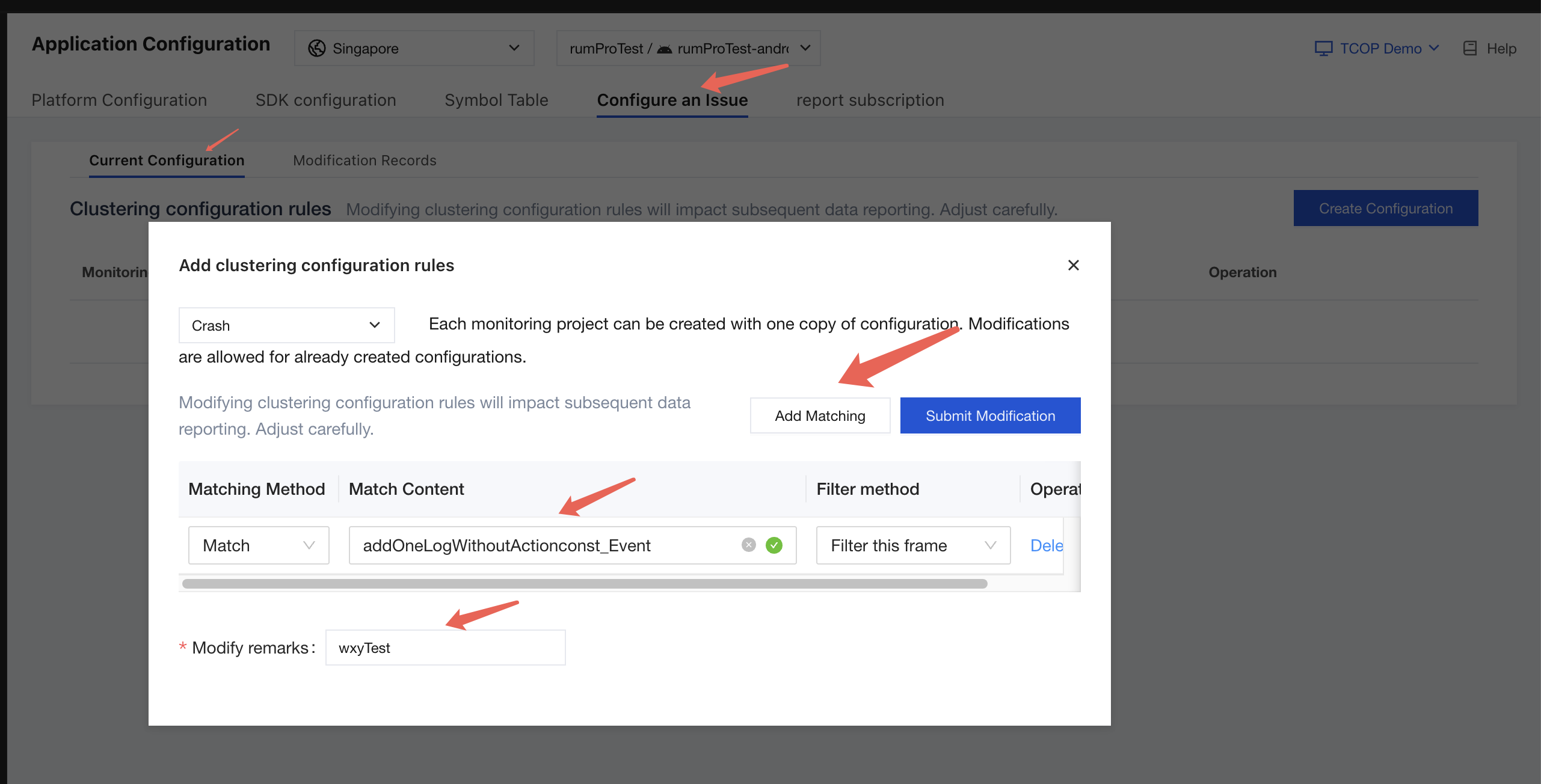
The basic approach to adjusting clustering is to influence the feature extraction results through the configuration described above. Currently, two matching methods are supported:
Regular expression: a standard regular expression that can match frames with corresponding features.
Contains match: keyword matching that hits frames containing the corresponding string through lookup.
After finding the corresponding match, you can perform the following two filtering methods:
Filter this frame: filter the corresponding frame after matching.
Filter all frames above/below: filter all frames above/below the start of the matched frame.
For a more intuitive understanding, here is an example with the following stack:
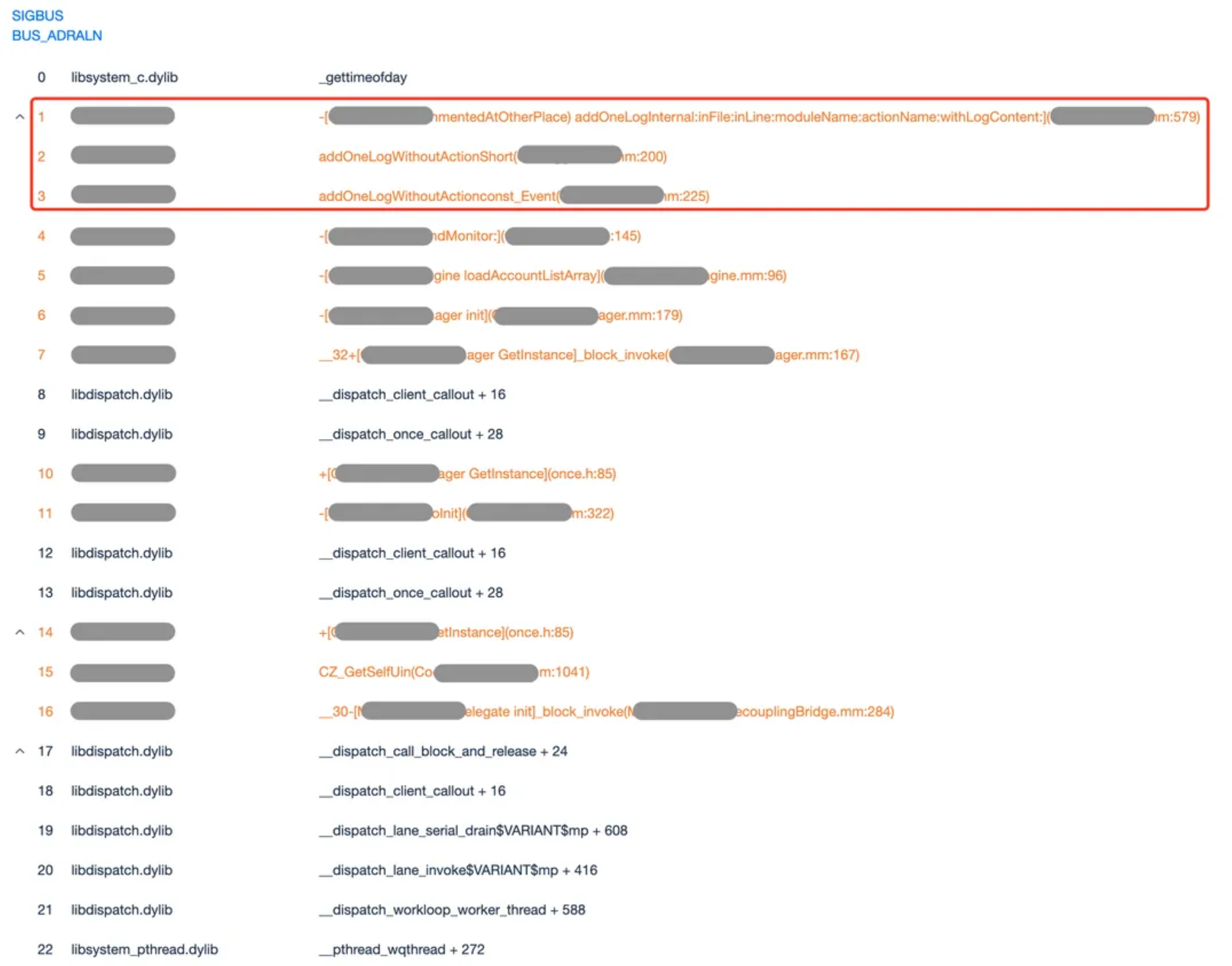
With the default algorithm, the first three frames are extracted as features for clustering. However, because they belong to a relatively low-level shared module, issues from many different call paths are clustered together. Therefore, you can adjust this through the configuration described above.
We want subsequent feature extraction to exclude call frames that contain common logging logic. Based on the above, you can configure the following rules:
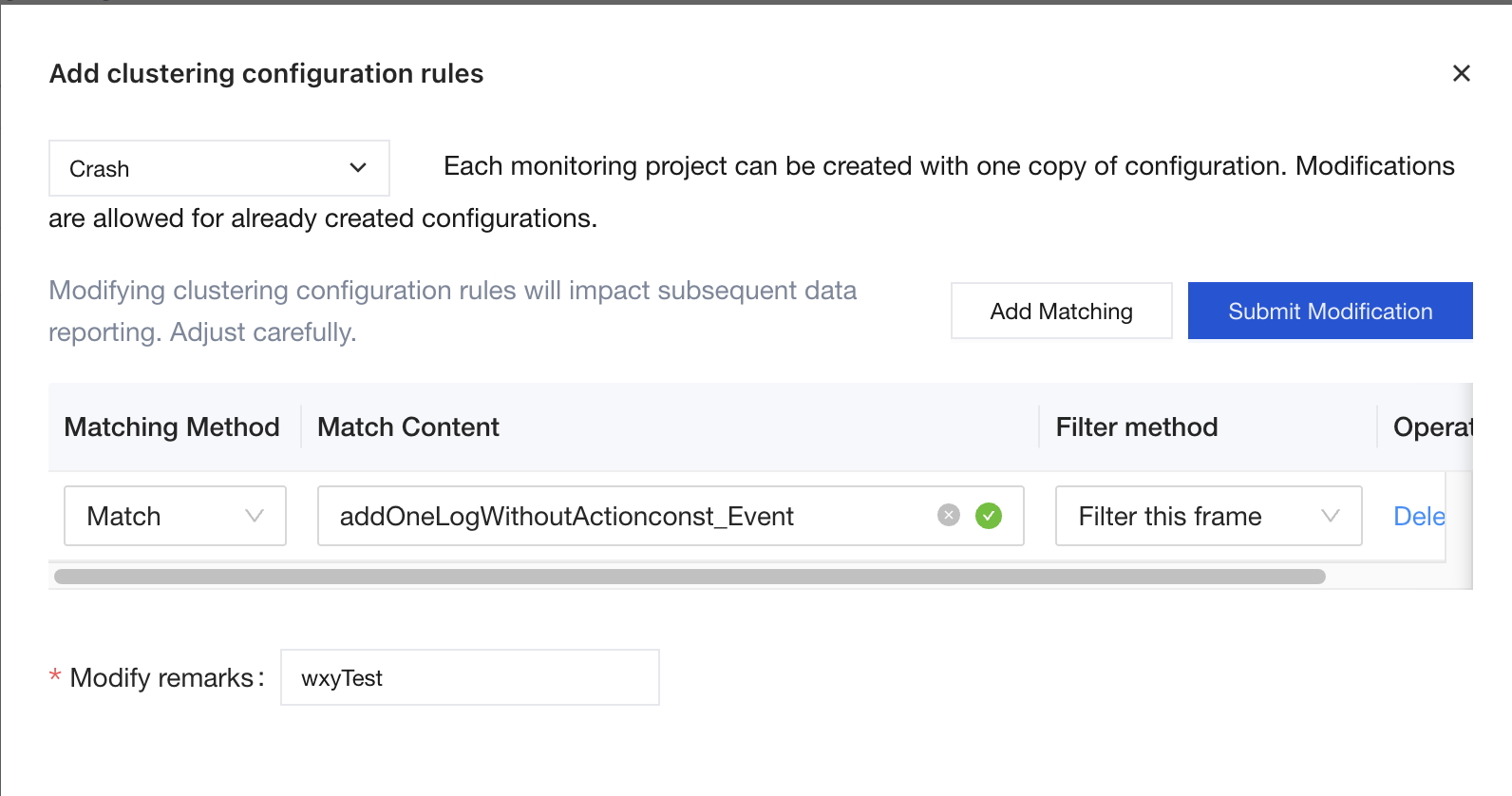
By filtering frames above addOneLogWithoutActionconst_Event, feature extraction is forced to bypass this point, thereby intervening in the clustering results.
Note:
Because configuration adjustments can affect clustering results, and the stability of the Issue list is critical for business personnel, Issue configuration adjustments can only be performed by a platform administrator.
Data Changes During Clustering Adjustment
After submitting the modification, you need to approve the corresponding modification in the modification record. It can only take effect when its status changes to Effective.

Consistent with configuration adjustments, the approval here can only be performed by a platform administrator other than the configuration submitter.
It is important to note that after approval, the newly configured rules only take effect on data reported subsequently, and existing data already reported and stored in Issues will not be affected.
Must-Knows
After adjusting and approving the clustering configuration as described above, users can adjust the clustering results. Note the following points about clustering adjustment:
Because the applied configuration rules take effect on all reported data, keep matching rules as minimal as possible when making adjustments. That is, try to affect only the intended changes, and avoid configuring overly broad matching rules to prevent impacting other Issues.
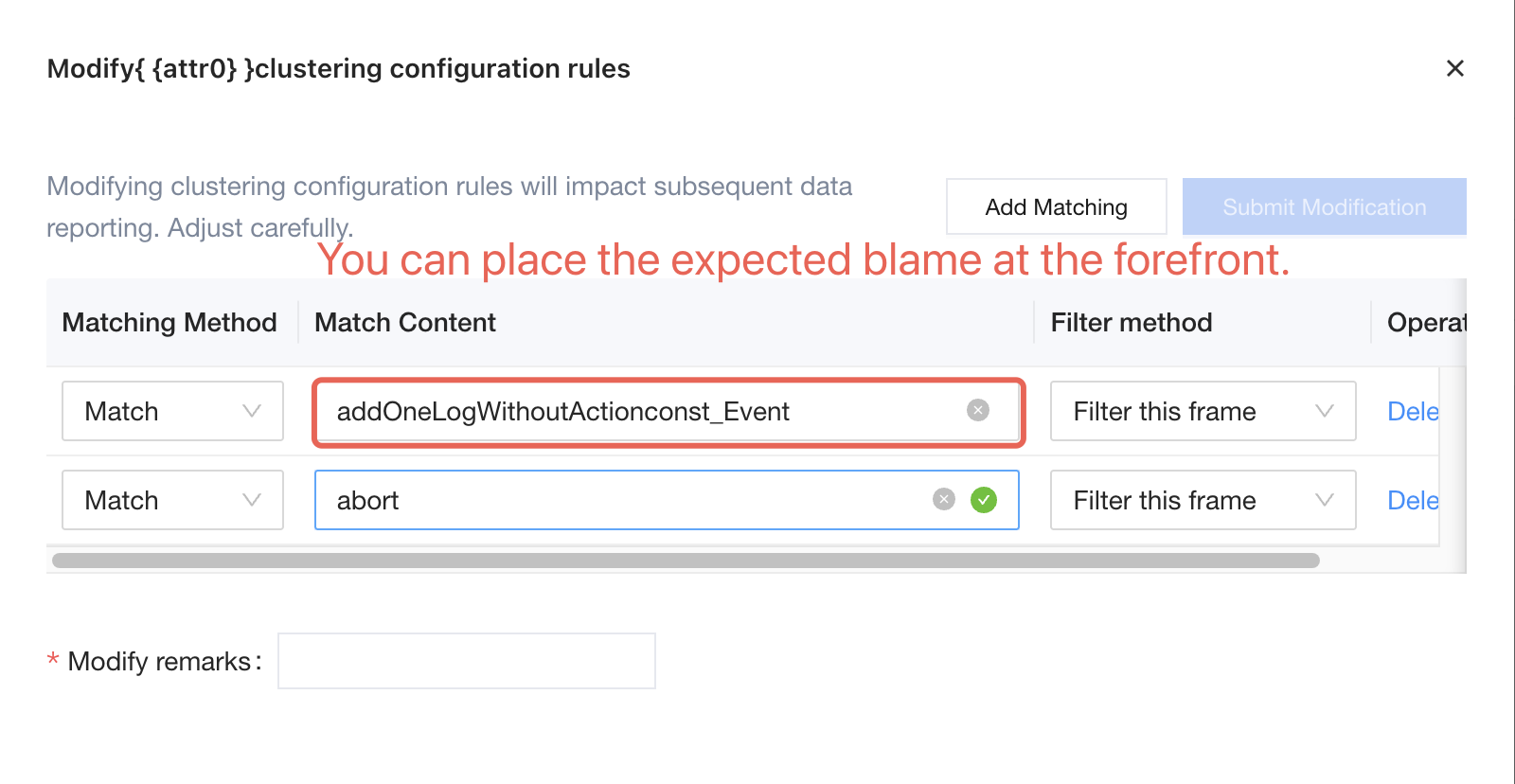
Configured application rules are applied sequentially in the order of existing rules in the configuration, and matching stops once a rule is hit. Therefore, you can place the desired rules earlier for matching.
Help and Support
Was this page helpful?
You can also Contact sales or Submit a Ticket for help.
Help us improve! Rate your documentation experience in 5 mins.
Feedback