Enabling and Disabling the Connection Pool Feature
Download
Focus Mode
Font Size
This document provides instructions on enabling and disabling the connection pool feature.
Prerequisites
Enabling the Connection Pool Feature
1. Log in to the TencentDB for PostgreSQL console.
2. Locate the target instance in the instance list, click the Instance ID, and go to the instance management page.
3. On the instance management page, select the Database Proxy tab.
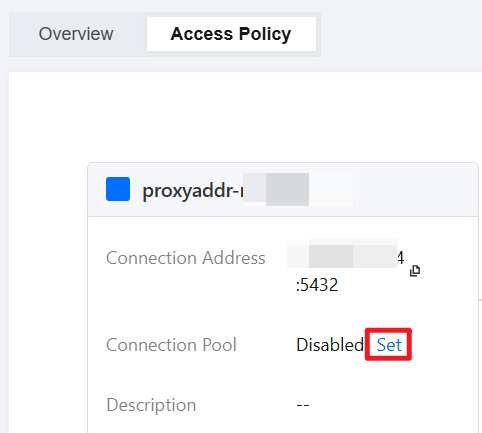
4. Select the Access Policy tab and click Set next to Connection Pool.
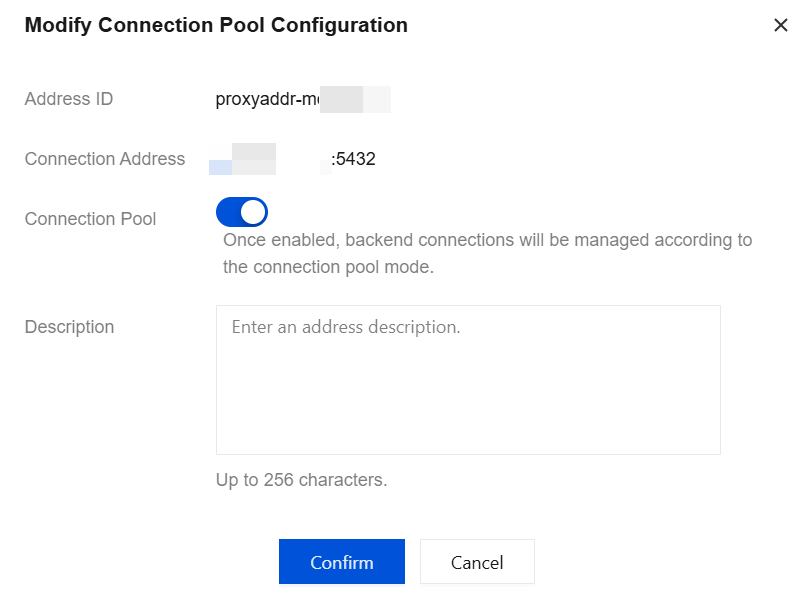
5. In the pop-up dialog box, enable the connection pool feature, enter a description (optional), and click Confirm.
Disabling the Connection Pool Feature
1. Log in to the TencentDB for PostgreSQL console.
2. Locate the target instance in the instance list, click the Instance ID, and go to the instance management page.
3. On the instance management page, select the Database Proxy tab.
4. Select the Access Policy tab and click Set next to Connection Pool.
5. In the pop-up dialog box, disable the connection pool feature and click Confirm.
Help and Support
Was this page helpful?
You can also Contact sales or Submit a Ticket for help.
Help us improve! Rate your documentation experience in 5 mins.
Feedback