Countdown
Unduh
Mode fokus
Ukuran font
Component Feature
Countdown component for displaying remaining time, customizable style and complete callback.
Basic Usage
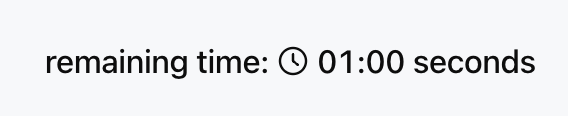
Set the total duration and customize the display text for prefix and suffix.
Template example:
<Countdown duration={60} prefix="remaining time: " suffix=" seconds" />
Effect display as follows:
Attribute Description
Property Name | Type | Description | Default value |
duration ★ | number | Total Countdown Duration (Seconds) | - |
prefix | string | Countdown prefix text | - |
suffix | string | Countdown suffix text | - |
size | "xs" | "sm" | "md" | "lg" | "xl" | Component size (align with Text) | "md" |
color | string | ThemeColor | text color | - |
onComplete | ActionConfig | Action triggered when countdown ends | - |
Note:
★ Marked with required attribute.
Color Configuration
color property supports the following types:Text color tokens, such as
"text-primary", "text-secondary".Primitive color tokens, such as
"blue-500", "red-600".CSS color string, such as
"#FF0000", "rgb(255, 0, 0)".Theme-aware object
{ "light": "#000000", "dark": "#FFFFFF" }.Usage Examples
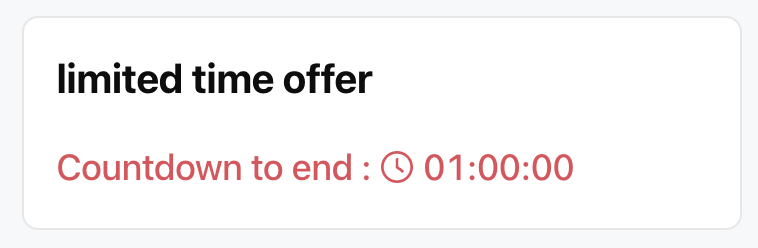
Template example:
<Card><Title value="limited time offer" /><Countdownduration={3600}prefix="Countdown to end : "size="lg"color={{ light: "#E34D59", dark: "#F66F6A" }}onComplete={{type: "show_message",payload: { message: "Promotion stopped" }}}/></Card>
Effect display as follows:
Display Format
The countdown will automatically adjust the displayed content based on the remaining time.
Less than 1 minute: only display seconds, for example 59 seconds.
Less than 1 hour: display minutes and seconds, for example 12 minutes 30 seconds.
1 hour or more: display hours, minutes and seconds, for example 1 hour 15 minutes 20 seconds.
Bantuan dan Dukungan
Apakah halaman ini membantu?
Anda juga dapat Menghubungi Penjualan atau Mengirimkan Tiket untuk meminta bantuan.
masukan