Hybrid Cloud Account Management
다운로드
포커스 모드
폰트 크기
The core objective of hybrid cloud account management is to achieve automatic synchronization and centralized Ops management of assets under the accounts by uniformly entering the information of each cloud account. This document describes how to add and manage hybrid cloud accounts.
Operation Steps
1. Log in to the BH console.
2. In the left sidebar, choose Account Mgmt > Hybrid Cloud Account Management.
3. On the Hybrid Cloud Account Management page, click Add Cloud Account and configure the task information.
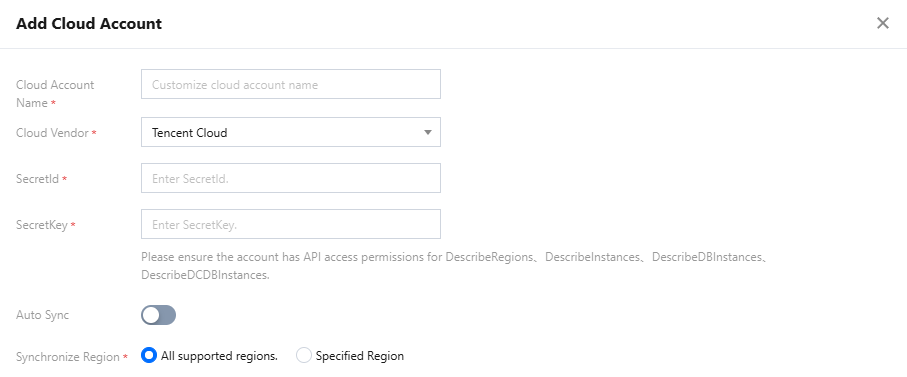
Parameter Name | Description |
Cloud Account Name | Customize the cloud account name (for subsequent identification and management). |
Cloud Vendor | Select the cloud service provider to which the cloud account belongs. Currently, Tencent Cloud and Alibaba Cloud are supported. |
SecretId & SecretKey | API access key ID for the cloud provider account (used by the system to call cloud provider APIs for asset synchronization). If you select Tencent Cloud as the cloud provider, enter the SecretId and SecretKey of your Tencent Cloud account in the corresponding input fields. Attention: Ensure that the account has the API call permissions for DescribeRegions, DescribeInstances, DescribeDBInstances, DescribeDCDBInstances, and others. Otherwise, you cannot pull asset information. If you select Alibaba Cloud as the cloud provider, enter the AccessKey ID and AccessKey Secret of your Alibaba Cloud account in the corresponding input fields. Attention: Ensure that the provided account has the permissions to call the DescribeRegions, DescribeInstances, and DescribeDBInstances APIs. Otherwise, asset information cannot be pulled. |
Auto Sync | Select whether to enable the asset auto-synchronization feature. |
Sync period | The time interval for asset auto-synchronization. |
Synchronize Region | Select the cloud provider region where the assets to be synchronized are located. |
Department | Select the department to which the asset belongs from the dropdown list. (The department feature is available only to customers who need it. To enable it, submit a ticket to contact us.) |
4. After configuring the account information, click OK to add it successfully.
Note:
The interval between two synchronizations is 10 minutes. Do not trigger synchronizations frequently.
피드백