Retry Policy
다운로드
포커스 모드
폰트 크기
Function Introduction
MCP Gateway supports configuring application-layer call retries for individual MCP Tools. This improves invocation success rates at the Tool granularity and automatically tolerates temporary backend failures. Its core capabilities include:
Tool-level independent configuration: Each Tool has its own retry configuration, which is not inherited from or downgraded to the Server-level / Route-level.
Three Types of Retry Conditions: Retries can be triggered based on three conditions: "backend 5xx", "connection failure", or "request timeout". You can select one or a combination of these conditions.
Idempotency Safety Protection: For non-idempotent methods such as
POST / PUT / PATCH, retries can only be enabled after explicitly confirming that the backend API is idempotent. This prevents duplicate writes and the resulting data side effects.Disabled by default: Retry is not enabled by default for both existing and newly created Tools. Their behavior remains completely consistent with the original, and you can enable retry as needed.
Note:
Retry is only effective for Tools of the HTTP-to-MCP service. For Tools of standard MCP services, fault tolerance is handled by the backend MCP Server itself, and the gateway does not provide retry configuration.
Retry Parameter Description
Parameter | Value Range | Description |
Enable retry | On / Off | The master switch for retries. When the master switch is disabled, all configurations below do not take effect. |
Number of retries | 1 ~ 5 | Required when retry is enabled. For non-idempotent methods, it is recommended to set this to 1. |
Retry condition | 5xx / Connection failure / Request timeout | Select at least one option when retry is enabled. |
Backend API idempotency confirmed. | Select / Deselect | Select this option when the Tool's HTTP Method is POST/PUT/PATCH; otherwise, the configuration cannot be saved. This option can be ignored for GET/HEAD/OPTIONS/DELETE. |
Coverage of the Three Types of Retry Conditions
Retry Condition | Trigger Scenario |
Backend 5xx | Backend returns 500 / 502 / 503 / 504 status codes. |
Connection failure | Errors that occur before the gateway receives the first byte of response from the backend, including TCP connection establishment failure, connection refused, DNS resolution failure, and peer RST during the request sending / response header reading phase after connection establishment. |
Request timeout | Read/write timeout / upstream processing timeout |
Configuring Retry
1. Log in to the Microservices Platform console. In the left sidebar, select AI Gateway to go to the instance list.
2. On the Instance List page, click the ID of the gateway instance you want to configure to go to its Basic Information page.
3. Go to the Tool List / Tool Details page of the target MCP Server and locate the Tool that requires retry. The Server to which this Tool belongs must be an HTTP-to-MCP service.
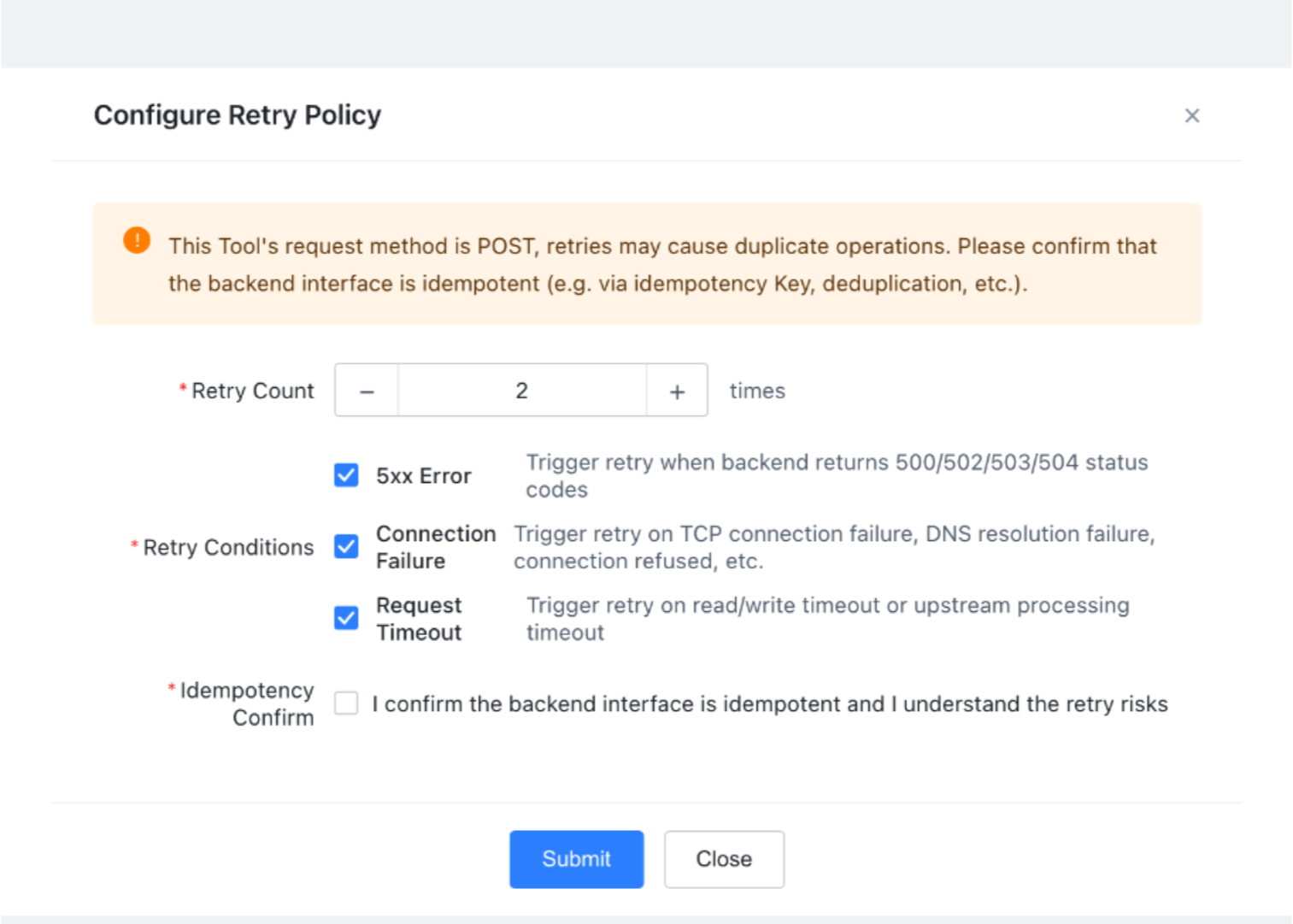
4. Expand the Configure Retry Policy collapsible panel.
5. Enter the Retry Count (1 to 5).
6. Select the Retry Condition(s) (5xx / connection failure / request timeout, at least one).
7. If the Tool's HTTP Method is POST / PUT / PATCH, you must select the "Backend API idempotency confirmed" checkbox. Otherwise, the save operation will be rejected.
8. Click Save. The configuration will be delivered to the data plane and take effect.
Modifying and Disabling Retry
Modify: Expand the Tool's "Retry Policy" panel again, adjust the parameters, and then save. The changes take effect within approximately 5 seconds.
Disable / Clear: Turn off the master "Enable Retry" switch and save, or delete the retry configuration. The Tool will revert to a non-retry state (its behavior will be consistent with existing Tools).
When you delete the Tool, its retry configuration is automatically and cascadingly cleared. No separate action is required.
피드백