Smart Commit
다운로드
포커스 모드
폰트 크기
Smart Commit is a Git commit assistance feature provided by CodeBuddy. It automatically analyzes code changes, intelligently generates standardized commit messages, and helps developers standardize their development workflow and improve team collaboration efficiency.
Features
Intelligent Analysis: Automatically analyzes code changes and understands the intent of modifications.
Standardized Generation: Generate commit messages that comply with the Conventional Commits specification.
One-Click Commit: Simplifies the Git commit workflow and improves development efficiency.
Multilingual Support: Supports generating commit messages in both Chinese and English.
Using Smart Commit
Triggering via the Git Panel
Click to add individual or all files to the staging area. Then click the "AI COMMIT" button on the right side of the message.
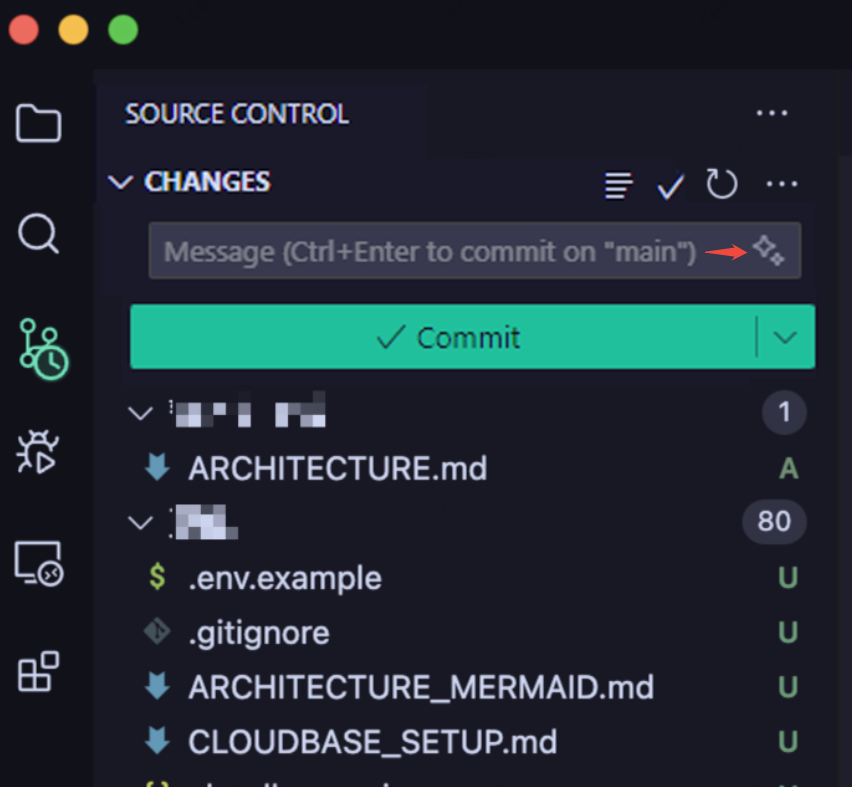
1. In the Git panel of the IDE, view the file changes to be committed.
2. Click the Smart Commit button in CodeBuddy.
3. The Agent automatically analyzes the changes and generates a commit message.
4. After confirming that everything is correct, click Submit.
Commit Message Conventions
Commit messages generated by Smart Commit follow the Conventional Commits specification:
<type>(<scope>): <subject><body>
Common Types
Type | Description |
feat | New feature |
fix | Fix bugs |
docs | Documentation update |
style | Code formatting adjustment (does not affect code logic) |
refactor | Code refactoring (neither a new feature nor a bug fix) |
perf | Performance optimization |
test | Add or modify tests |
chore | Changes to build processes or auxiliary tools |
Usage Examples
Suppose you modified the authentication logic of the login module. Smart Commit may generate a commit message like the following:
fix(auth): fix the error message when login authentication fails.- Fix the issue where no error message was displayed when the username was empty.- Optimize the prompt message for incorrect passwords.- Add a limit on the number of login failures.
FAQs
Q1: How to Modify a Generated commit message?
You can manually edit the generated commit message before committing and adjust it as needed.
Q2: What Git Operations Are Supported?
Smart Commit mainly supports:
Generate a commit message.
Run git commit.
It can be used with other Git operations, such as push and merge.
피드백