Configuring Event Alarms
다운로드
포커스 모드
폰트 크기
Overview
TencentDB for MongoDB has been integrated with Tencent Cloud Observability Platform, supporting the reporting of Tencent Cloud Observability Platform events. All Tencent Cloud Observability Platform events will be automatically delivered to Tencent Cloud's EventBridge in the Cloud Service Event Bus. Tencent Cloud Event Bridge (EventBridge) is a secure, stable, and efficient serverless event management platform. An event is a data record of a status change. Releasing an event from the event source to EventBridge needs to comply with CloudEvents specifications. For more information about the specifications, see CloudEvents 1.0.
Event Target
An event rule can have multiple event targets. Before creating an event rule, first plan the event target types. Event Bridge currently supports the following event targets:
Message Push (only supports rules in the cloud service event bus)
TencentDB for MongoDB Event
Event Chinese Name | Event English Name | Event Type | Subordinate Dimension | Recovery Concept Availability | Event Description | Solution and Suggestion |
Number of Connections Exceeding Limit | connectionOverlimit | Exception event | Instance dimension | Yes | Number of instance connections exceeds the maximum limit. | Increase the maximum number of connections or restart the instance. For specific operations, see Solutions for Exceeded Connection Limit. For database performance optimization, see Analysis and Resolution Methods for Abnormal High Connection Usage. |
Database Primary/Secondary Switchover | primaryswitch | Exception event | Instance dimension | Yes | Instance primary node is abnormal, and switching with the secondary node occurs. This event may be triggered in case of physical server failure. | Confirm whether the instance status is normal. |
Disk Space About to Run out | instanceDiskSpaceLow | Exception event | Instance dimension | Yes | The disk space is about to be filled, which may cause the instance to become read-only. | |
Node CPU Exception | NodeCPUAbnormal | Exception event | Instance dimension | Yes | If any node in the cluster reaches 80% CPU usage, an alarm is immediately triggered. | |
SSL Certificates About to Expire | SSLCertAboutToExpire | Exception event | Instance dimension | No | The SSL Certificates used by the instance are about to expire. | Update the SSL Certificates for the current instance. For specific operations, see Enable SSL authentication. |
Node OOM | NodeOom | Exception event | Instance dimension | No | Memory usage of the Mongod node is overloaded. | Evaluate whether the current database memory specifications meet business requirements. If more memory is needed, upgrade the configuration. For specific information, see Change Mongod Node Configuration Specifications. |
Node Restart | NodeReboot | Exception event | Instance dimension | No | Mongod node restart | If the restart is unplanned (such as not initiated by an active operation, parameter change, instance upgrade, or node migration, and so on), check whether excessive business load caused the restart. If necessary, upgrade the configuration. |
Node Status Abnormal | NodeAbnormal | Exception event | Instance dimension | Yes | Mongod or Mongos Node status is abnormal, which may affect the service. | Manually check the node status. If the issue cannot be resolved, you can submit a ticket for handling. |
Excessive Backup Alarm | BackupStorageSizeExceed | Exception event | Instance dimension | No | No impact on business. |
Billing Overview
Tencent Cloud offers EventBridge as a pay-as-you-go service. For more information, see EventBridge > Product Pricing.
Type | Pay-as-You-Go |
Payment Method | Settles hourly based on the actual number of events delivered to the event set. |
Billing Unit | CNY per million events. |
Usage Scenario | Application scenarios with low or fluctuating message volumes can effectively avoid resource waste. |
Directions
1. Log in to the Tencent Cloud EventBridge console and select Event Rule from the left sidebar.
2. At the top of the page on the right, under the Region, select Guangzhou, then select Event Set from the dropdown list and select default .
Note:
The cloud service event bus collects Monitor and Audit events generated by Tencent Cloud services across all regions. It is created by default in Guangzhou and cannot be deleted.
In the left sidebar, choose Event Set. In the Event Set list, click Default to view the default event bus which already includes TencentDB for MongoDB. For specific operations, see Tencent Cloud Service Event Source.
3. On the Event Rule page, click Create. On the Event Pattern navigation page, configure the page parameters according to the parameter explanations shown in the following table.
Interface Area | Interface Parameter | Parameter Explanation |
Basic Information | Region | The region where the event rule is created. |
| Event Bus | Information about the event bus to which the event rule belongs. |
| Rule name | Set the name of the event rule. It can only contain letters, numbers, underscores, hyphens, must start with a letter, and end with a number or letter, between 2 and 60 characters. |
| Rule description | A brief description of the event rule. |
| Tag | Set the tag key and value for the event. |
| Data conversion | Select whether data formatting conversion is required. |
Event sample | Tencent Cloud service | In the dropdown list, you can search for MongoDB and select TencentDB for MongoDB. |
| Select event sample | In the dropdown list, select the specific event corresponding to MongoDB. For example: database primary/secondary switchover. The input box below will display a specific example of the event. |
Event matching | Rule pattern | Template: This pattern allows you to select Tencent cloud service and Event type, providing event matching rules. Custom events: Define event matching rules in the input box below. For rule writing instructions, click Examples. |
| Tencent Cloud service | When Rule pattern set to Form, this parameter is shown. In the dropdown list, select TencentDB for MongoDB. |
| Event Type | When Rule pattern is set to Form, this parameter is displayed. In the dropdown list, select the supported event types. |
| Subject to match | Preview the generated event matching rules. |
4. click Test matching rule to test the defined event matching rules. After passing the test, click Next. If the test fails, correct it according to the prompt information.
5. (Optional) If you need to convert the data format, the Event transformation page is displayed as shown in the following figure. Configure the format and fields for data transformation according to the parameter explanations in the table below.
Note:
Data conversion offers a simple data processing feature. By the input data and configured items, it can carry out data formatting, return the processed structured data, distribute to downstream targets, and create a bridge between data sources and data processing systems.
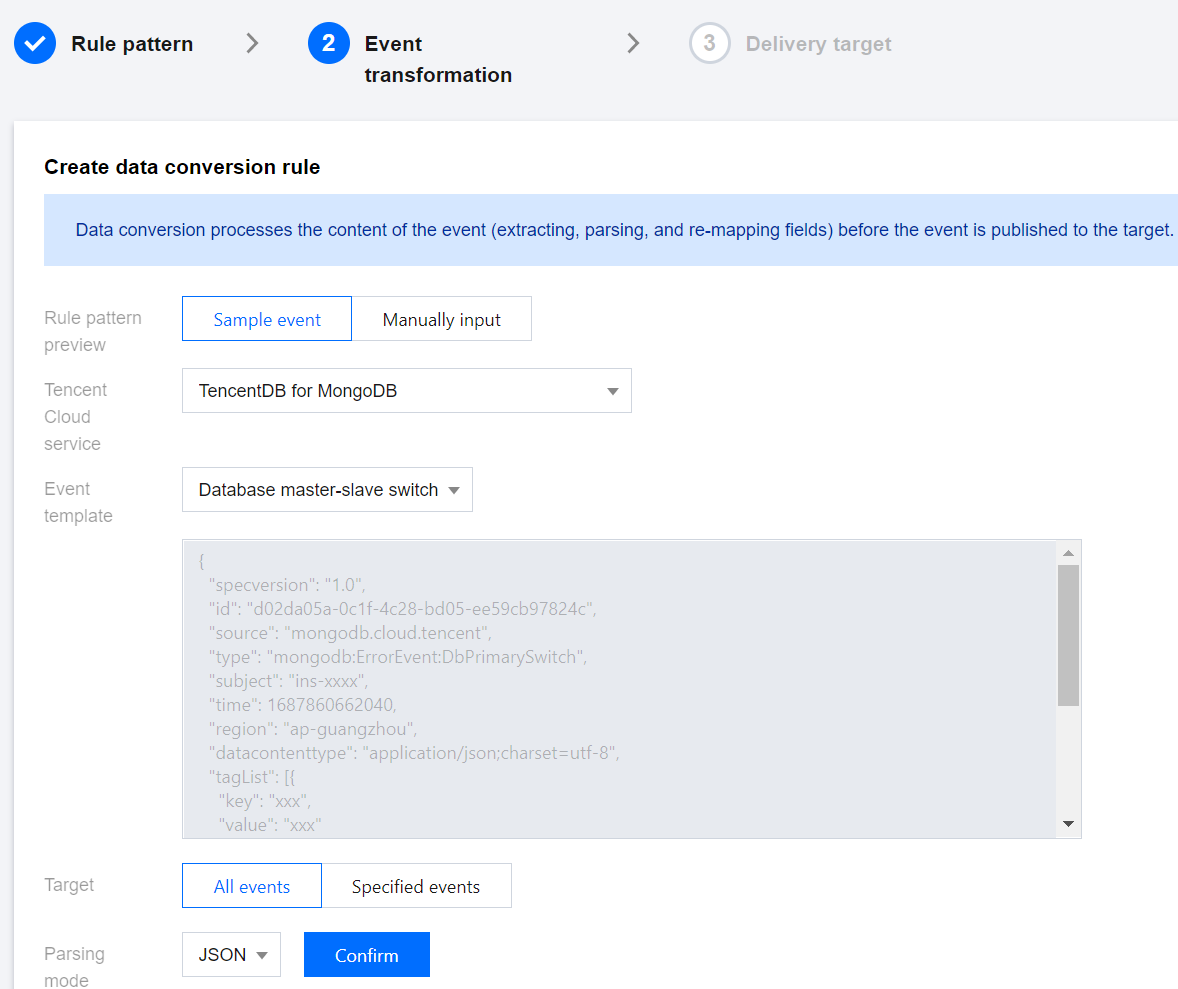
Interface Area | Interface Parameter | Parameter Explanation |
Create data conversion rule | Event pattern preview | By selecting Sample Event, you can use the event template; By selecting Manually Input, you can define the event fields in the input box below. |
| Event template | For Event Pattern Preview, select Sample Event to display the parameter. In the dropdown list, you can search for MongoDB and select a template for MongoDB events. In the input box below, the specific field information of the event template will be displayed. |
| Target | All events: Routes the complete structure of event fields to the event target. Specified events: Event Bridge uses JSONPath configuration to extract event fields and routes the specified event fields to the event target. |
| JSONPath | When you select specified events for the conversion target, this parameter is displayed. Enter the event fields you wish to convert in the input box. |
| Parsing mode | Select a parsing mode. Supports JSON, separators, and extract with regex. |
| Parsing result | Click Confirm after the parsing mode to start parsing data, converting event rules into a Key-Value format. |
| Filter | Configure the filter to only output data that meets the filter rules. |
| Data processing | For the current parsed data, select the data type in the TYPE column. |
| Test results | Click Test to perform a validity check and output the final conversion result. |
Failure Information Handling | Dead Letter Queue | Configure whether to deliver messages that cannot be processed normally to the dead letter queue of Ckafka. |
| Delivery Type | The delivery type for failed messages is fixed as Ckafka. |
| CKafka Instance | Select the instance ID of the Ckafka for failed message delivery. |
| CKafka Topic | Select the Topic of the Ckafka instance for failed message delivery. CKafka uses the concept of Topic externally, where producers write messages to Topics and consumers read messages from Topics. |
6. Click Confirm after the parsing mode to begin data parsing. Wait until the completion of data parsing. Set filter rules and data processing methods. For specific operations, see Configuring Data Conversion.
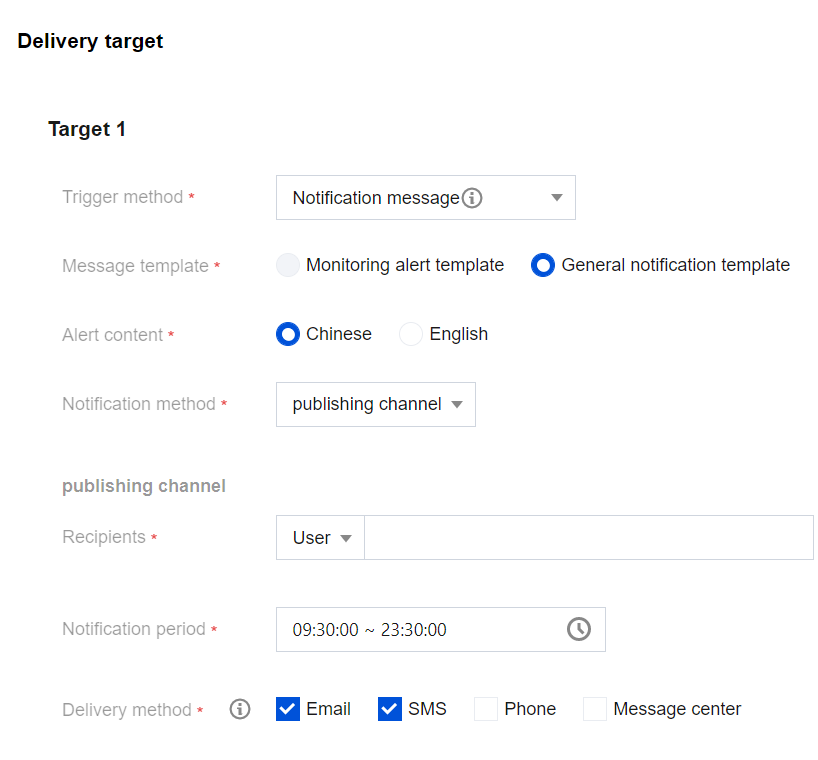
7. Click Next to select the event target bound to this rule. You can deliver the collected events to the specified delivery target for completing processing and consuming. The following figure takes the Trigger method as Notification message as an example. To configure event alarm push, see Configuring Push Target.
8. To immediately activate the event rule, check Enable Event Rule Immediately, and click Complete.
Event Rule Related Interface
Interface Name | Interface Feature |
Validation Rules | |
Create Event Rule | |
Delete Event Rule | |
Retrieve Event Rule Details | |
Retrieve Event Rule List | |
Update Event Rules |
More Operations
FAQs
피드백