Instalar o serviço chronyd no CentOS 8
Download
Focus Mode
Font Size
Visão geral
Atualmente, o CentOS 8 nativo não permite a configuração do serviço NTP. Em vez disso, é necessário usar o chronyd para fornecer um tempo preciso. Este documento descreve como instalar e configurar o chronyd em uma instância do CVM do Tencent Cloud baseada no CentOS 8.
Instruções
Instalação e configuração do serviço chronyd
2. Execute o comando a seguir para instalar o serviço chronyd.
yum -y install chrony
3. Execute o comando a seguir para modificar o arquivo de configuração
chrony.conf.vim /etc/chrony.conf
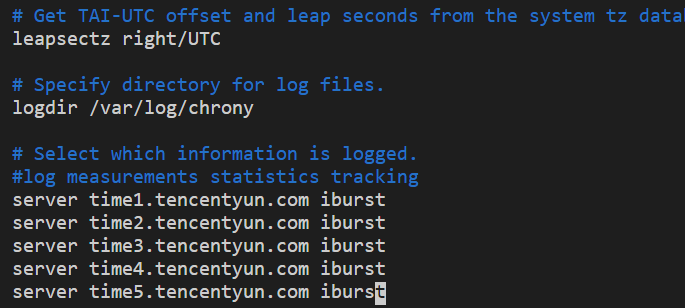
4. Pressione i para acessar o modo de edição e insira o conteúdo a seguir na linha posterior à
#log measurements statistics tracking.server time1.tencentyun.com iburstserver time2.tencentyun.com iburstserver time3.tencentyun.com iburstserver time4.tencentyun.com iburstserver time5.tencentyun.com iburst
O resultado deve ser o seguinte:
5. Pressione Esc e digite :wq para salvar e fechar o arquivo.
6. Execute os comandos a seguir em sequência para ativar a inicialização automática do chronyd e reiniciá-lo.
systemctl restart chronyd
systemctl enable chronyd
Verificação das configurações
1. Execute o comando a seguir para verificar se o relógio está sincronizado.
date
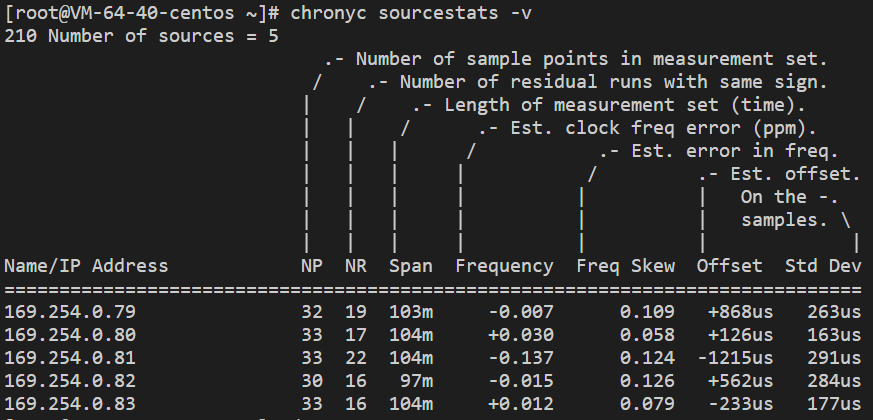
2. Execute o comando a seguir para verificar o status da fonte do relógio.
chronyc sourcestats -v
Se um resultado semelhante ao seguinte for retornado, a configuração obteve êxito.
Apêndice
Comandos
Comando | Descrição |
chronyc sources -v | Verifica a fonte do relógio. |
chronyc sourcestats -v | Verifica o status da fonte do relógio. |
timedatectl set-local-rtc 1 | Configura o relógio em tempo real. O formato padrão é UTC. |
timedatectl set-ntp yes | Ativa o serviço NTP para sincronização. |
chronyc tracking | Calibra o servidor NTP. |
chronyc -a makestep | Força a sincronização do relógio do sistema. |
Help and Support
Was this page helpful?
You can also Contact sales or Submit a Ticket for help.
Help us improve! Rate your documentation experience in 5 mins.
Feedback