Adding a Database (Administrator)
Download
Focus Mode
Font Size
Access various types of databases in DMC for unified data management, supporting collaborative management through multiple roles. This simplifies and standardizes database management operations, improving data management efficiency.
Supported database deployment modes include public network self-built databases, CVM self-built databases, and Tencent Cloud databases. For details, see Supported Databases.
Prerequisites
The source database instance has been created.
DMC service has been activated.
The operating user should hold the DMC administrator role, which is assigned to the Tencent Cloud root account by default. If a sub-account or collaborator under the root account needs to be set as a DMC administrator, see Adding Users.
Directions
1. Log in to the DMC console.
2. In the top menu bar, select Instance List.
3. Click Add Database to configure parameter information.
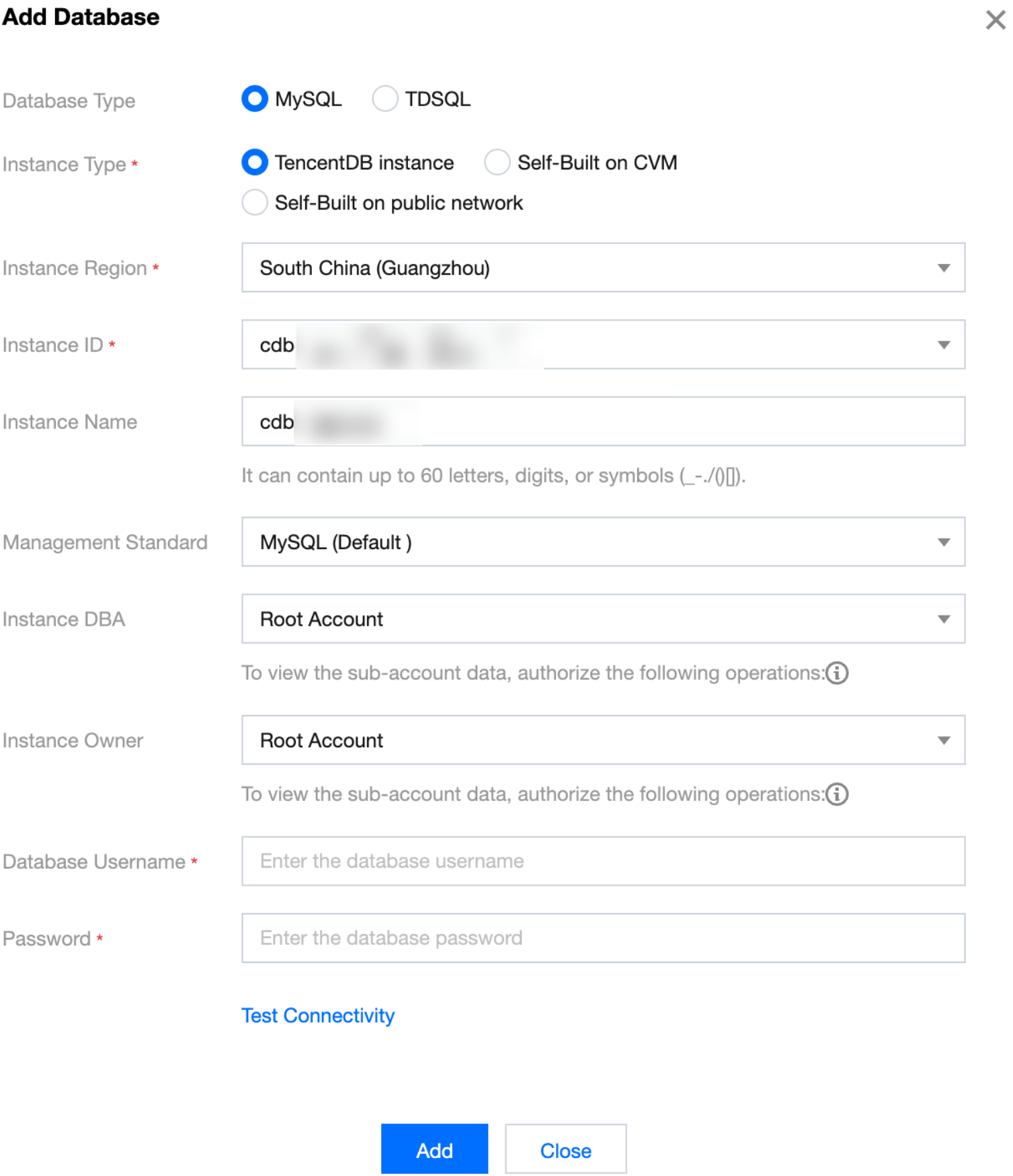
The parameter description is shown in the following table.
Parameter | Description |
Database Type | Supports two data types, MySQL and TDSQL for MySQL. For details on supported deployment modes and versions, see Supported Databases. |
Instance Type | TencentDB instance: The source database is a Tencent Cloud database instance. After selecting, you need to configure the instance region and instance ID. Self-Built on CVM: The source database is a self-built database on CVM. After selecting, you need to configure the instance region, instance ID, and instance IP and port. Self-Built on public network: The source database is a locally self-built database or a third-party cloud vendor database. After selecting, you need to configure the instance IP address and port. |
Instance Name | Customize the name of the DMC database instance. The name can only include numbers, uppercase and lowercase English letters, Chinese characters, and the special characters _ - . / ( ) [ ], with a maximum length of 60 characters. |
Management Standard | Select the specification name to be used for SQL window operations and SQL review. For managing specifications, see Manage SQL Specification. |
Instance DBA | Select the instance DBA role. If an instance DBA approval node has been set in System Management > Review Template, and the corresponding approval template is selected in System Management > Review Standard, subsequent ticket approvals will be required. For details on configuring approval templates and approval specifications, see Configuring Approval Templates and Configuring Approval Specifications. |
Instance Owner | Select the instance owner role. If an instance DBA approval node has been set in System Management > Review Template, and the corresponding approval template is selected in System Management > Review Standard, subsequent ticket approvals will be required. For details on configuring approval templates and approval specifications, see Configuring Approval Templates and Configuring Approval Specifications. |
Database Username | Enter the login username for the DMC database. |
Password | Enter the password corresponding to the DMC database username. |
4. After completing the configuration, click Test Connectivity. Once the test is successful, click Add.
After the addition is completed, you can view and manage your database in the DMC console.
Help and Support
Was this page helpful?
You can also Contact sales or Submit a Ticket for help.
Help us improve! Rate your documentation experience in 5 mins.
Feedback