Specifying an Accessible Model for a Consumer Group
Download
Focus Mode
Font Size
Scenarios
AI Gateway supports authorizing model APIs for consumer groups. On this basis, the model invocation permission control feature can further refine the authorization granularity from the API level to the model level: you can specify the range of models that a consumer group can call under a model API while authorizing that API for the group.
With this feature, you can meet the following governance requirements:
Group A can call all models under a specific API.
Group B can call only some of the text generation models under a specific API.
You can further narrow the accessible model permissions for specific members within the group authorization scope, allowing them to call only a few of the models.
Prerequisites
An AI Gateway instance has been activated.
A consumer group has been created and associated with consumers. For details, see Consumer Groups.
A model API has been created and associated with the corresponding model service. For details, see Model APIs.
To configure the scope by referencing a model access group, create a model access group first. For details, see Model Access Groups.
Configuring the Available Model Scope for a Consumer Group
When authorizing a model API for a consumer group, you need to configure the available model scope for each API at the same time.
1. Log in to the AI Gateway console and select the target gateway instance to go to its details page.
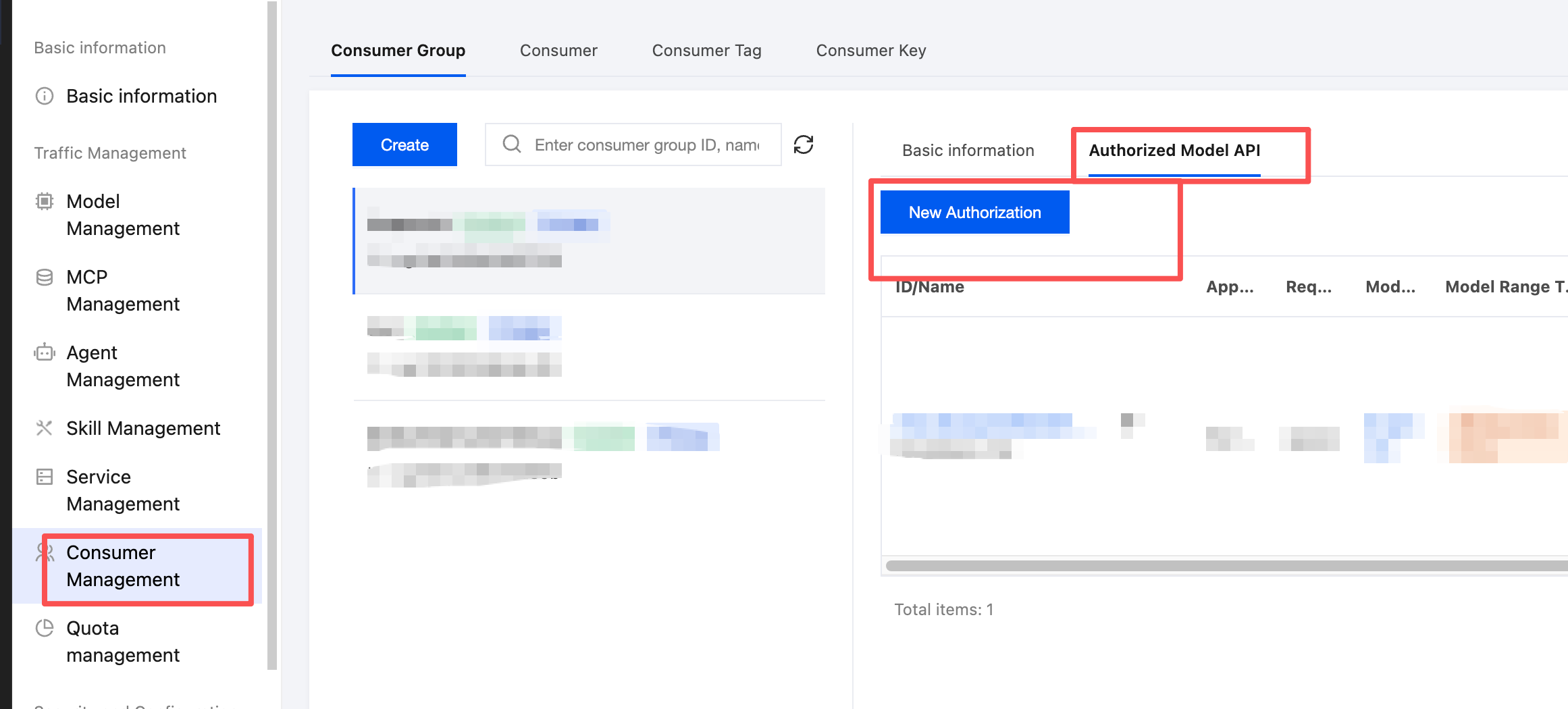
2. In the left sidebar, click Consumer Management, then click Consumer Groups > Authorized Model APIs to go to the model API authorization configuration entry of the target consumer group, and click Add Authorization.
3. Select Model APIs. Select one or more model APIs to authorize, and click Next.
4. Configure model availability scope. Specify the model availability scope type for each selected API one by one. The model availability scope type is single-choice and includes the following three types:
Specify Model Allowlist (default option, with no models selected by default): Manually select the models that are allowed to be called. You can search by model name. When this type is selected, models are required.
Reference Model Access Group: Select an existing model access group (MAG). Search is supported. When this type is selected, the model access group is required.
Allow All: Allows all models under this API, including models added in the future. We recommend that you prioritize "Specify Model Allowlist" or "Reference Model Access Group" to implement the principle of least privilege.
5. After configuring the scope for all APIs, click OK to complete the authorization and scope configuration.
Editing the Available Model Scope for a Consumer Group
1. Find the target API in the authorized model API list to view the details of models available to this group under this API.
2. Click Edit Available Model Scope to change the type and specific content of the model availability scope.
3. Click OK to save.
Configuring Available Models for Individual Consumers in a Group
1. On the Consumer Group Basic Information page - Consumer List, click Configure Available Models in the row of the target consumer.
2. Select a mode and configure:
Inherit Group Settings: Keeps the available model scope consistent with that configured for the consumer group.
Custom Allowlist: Supports modification and deletion, and can be further narrowed within the group scope.
3. Click Submit.
Note:
When configuration is performed for group members, the member's available scope can only be narrowed, not expanded, within the group's available scope. If the group's scope is reduced, the member's custom allowlist will be automatically narrowed based on the intersection.
Impact of Changing the Model Service Associated with an API
Editing an API and changing its associated model services will have a cascading impact on the configured model availability scope. When an association is removed, the corresponding model is automatically removed from the availability scope. Models from newly associated services are unavailable by default. To make a newly added model callable, manually edit the corresponding model access group or allowlist and select the new model.
Help and Support
Was this page helpful?
You can also Contact sales or Submit a Ticket for help.
Help us improve! Rate your documentation experience in 5 mins.
Feedback