Organization Overview
Download
Focus Mode
Font Size
The Organization Overview is the default homepage that enterprise administrators see after logging in to the WorkBuddy Enterprise admin console, designed to help them quickly grasp the overall status of the current enterprise. The page consists of four sections from top to bottom: Quick Guide, Enterprise Information & Subscription Status, Client Installation & Help Documentation, and Today's Overview, helping administrators complete the workflow of "assess the current status > locate the entry point > guide the next step" on a single page.
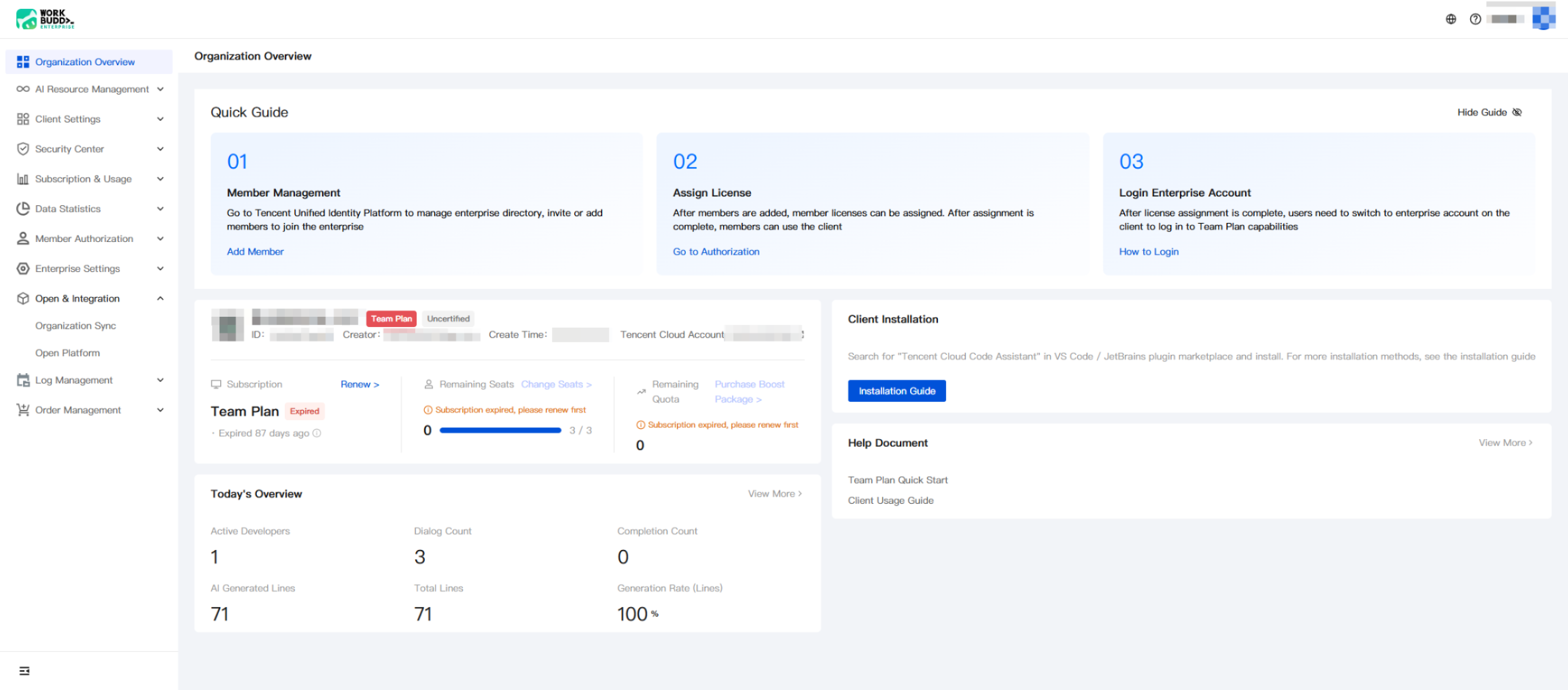
Page Section Description
I. Quick Start Guide
This three-step onboarding guide is designed for newly activated enterprises. Complete the steps in order to enable members to start using the WorkBuddy client. After completing initialization, administrators can click "Hide Guide" in the upper-right corner to collapse this section.
Step | Term | Description | Operation Entry |
01 | Member management | Go to the Tencent OneID platform to manage the corporate directory, invite members, or add members to the enterprise. | Add members > Go to OneID. |
02 | Assign licenses | After members are added, you can assign licenses to them. Once assigned, members can use the WorkBuddy client. | |
03 | Log in to enterprise account | After licenses are assigned, members need to switch to their enterprise accounts in the client to use the enterprise capabilities provided by Team Plan. |
Note:
For detailed operations corresponding to the three-step guide, see: Members & Departments, Organization Structure Sync, and Login.
II. Enterprise Information and Subscription Status
This section displays the basic information and subscription health of the current enterprise, making it the most important area for administrators to monitor on a daily basis. It includes enterprise identity, subscription edition, seat quota, and usage allowance.
Enterprise Information:
Field | Description |
Enterprise Logo and Name | Identity of the currently logged-in enterprise. |
Version Tag | Indicates the product edition used by the current enterprise, such as Team Plan. |
Certification Status | Indicates the enterprise identity verification status, such as "Unverified / Verified". Unverified enterprises will have limited access to some features, so it is recommended to complete verification as soon as possible. |
ID | Unique identifier of the enterprise within the platform. |
Creator. | Account that created the enterprise (usually a super administrator). |
Creation Time | Date when the enterprise was created. |
Tencent Cloud Account | Tencent Cloud root account bound to the current enterprise, used for subscription, invoicing, order, and other operations. |
Subscription Status (three cards):
Card | Displayed Content | Operation Entry |
Subscription status | Displays the current subscription edition (such as Team Plan), subscription status (Active/Expired), and remaining or expired days. | |
Remaining seats | Remaining assignable seats/total seats in the current enterprise. When seats are exhausted, client access cannot be authorized for members. | |
Remaining quota | Remaining usage quota of the current enterprise (such as Credits/Token quota). After it is exhausted, a top-up package can be purchased for replenishment. |
Note:
After the subscription expires, members will no longer be able to use Team Plan enterprise features. Please make timely adjustments by using "Renew Subscription" or "Change Seats".
When the remaining seats show 0 / N, new members will be unable to complete client authorization. Go to Subscription & Usage > Subscription Management to expand seats.
III. Client Installation and Help Documentation
Client Installation: Guides members through installing the WorkBuddy client / code assistant plugin.
Prompt members to search for the keyword in the VS Code / JetBrains plugin marketplace and complete the installation.
Click "Installation Guide" to view detailed installation steps and common issues.
Help Documentation: The most frequently used documentation entries for current enterprise administrators are displayed on the right.
Team Plan Quick Start: A comprehensive onboarding guide for newly activated enterprises.
Client User Guide: Instructions for members on using the client.
Click View More to go to the full Help Center.
IV. Today's Overview
The six most critical activity and output metrics of the enterprise are displayed on a daily basis, helping administrators quickly understand the enterprise's usage for the day. Click View More in the upper right corner to go to the R&D Efficiency Dashboard for complete dimensions and historical data.
Metric Value | Description |
Number of active developers | Number of unique members who actually used the WorkBuddy client on the current day. |
Number of conversations | Total number of conversations (sessions) initiated by members with the AI assistant on the current day. |
Number of Completions | Total number of times code completion was triggered on the current day. |
AI-generated lines of code | Number of lines of code generated by AI and accepted by members on the current day. |
Total lines of newly added code | Total number of newly added lines of code submitted by members on the current day, including handwritten and AI-generated code. |
Code generation rate (by line) | AI-generated code lines/total newly added code lines, reflecting the contribution of AI to development efficiency improvement. |
Note:
The data statistics caliber of Today's Overview is consistent with that of the R&D Efficiency Dashboard. For specific calculation rules and update frequency, see the corresponding documentation.
Help and Support
Was this page helpful?
You can also Contact sales or Submit a Ticket for help.
Help us improve! Rate your documentation experience in 5 mins.
Feedback