Basic Settings
Download
Focus Mode
Font Size
Super administrators can configure basic team information in the enterprise admin console, such as the enterprise name, enterprise avatar, product name, and product icon. However, the specific features vary by edition. The following sections describe these features.
Currently, the Team Edition admin console supports modifying the enterprise name and enterprise logo. The changes take effect for all enterprise members.
Enterprise Information Configuration
Go to the enterprise admin console and navigate to Enterprise Settings > Basic Settings to view enterprise information. The enterprise information section includes the configuration of the enterprise name and enterprise avatar.
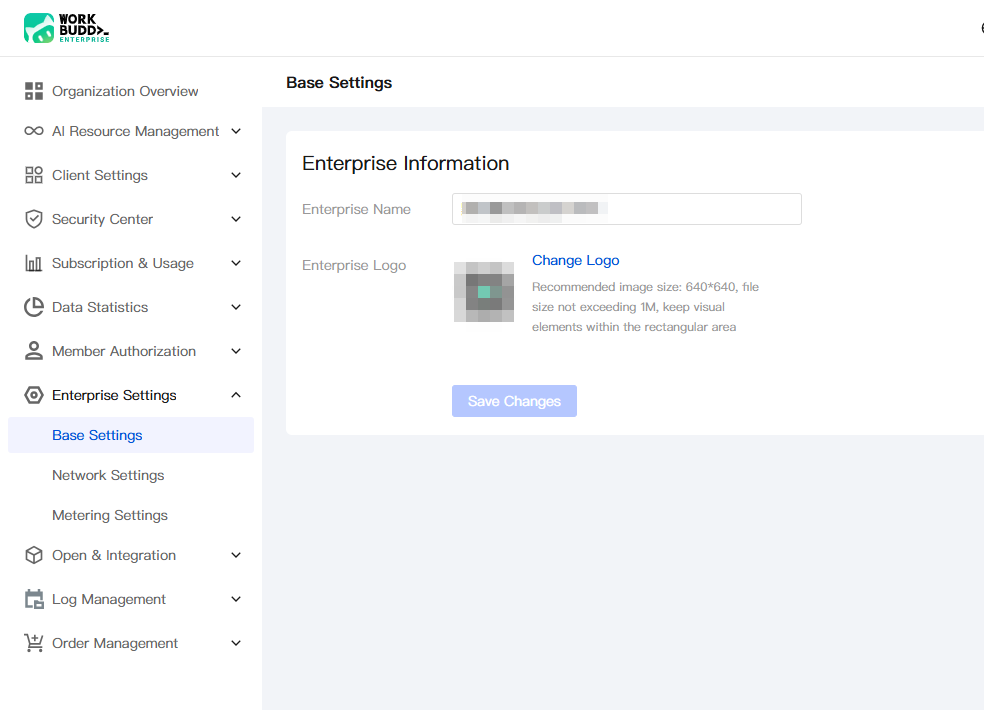
Enterprise name: Click the input box to start editing. You can modify your enterprise name.
Enterprise Logo: Click Change Logo to replace it. The recommended image size is 640 * 640 pixels, with a maximum file size of 1 MB. Keep visual elements within the rectangular area.
Help and Support
Was this page helpful?
You can also Contact sales or Submit a Ticket for help.
Help us improve! Rate your documentation experience in 5 mins.
Feedback