Network Settings
Download
Focus Mode
Font Size
WorkBuddy Enterprise provides an enterprise IP address allowlist configuration feature that enables enterprises to restrict plugin usage by IP address.
Operation Guide
Go to Enterprise Management Console, and configure the enterprise IP address allowlist in the Enterprise Settings > Network Settings menu. The IP address allowlist applies to the Code Assistant plugin, and restricted IP addresses cannot log in to or use the plugin.
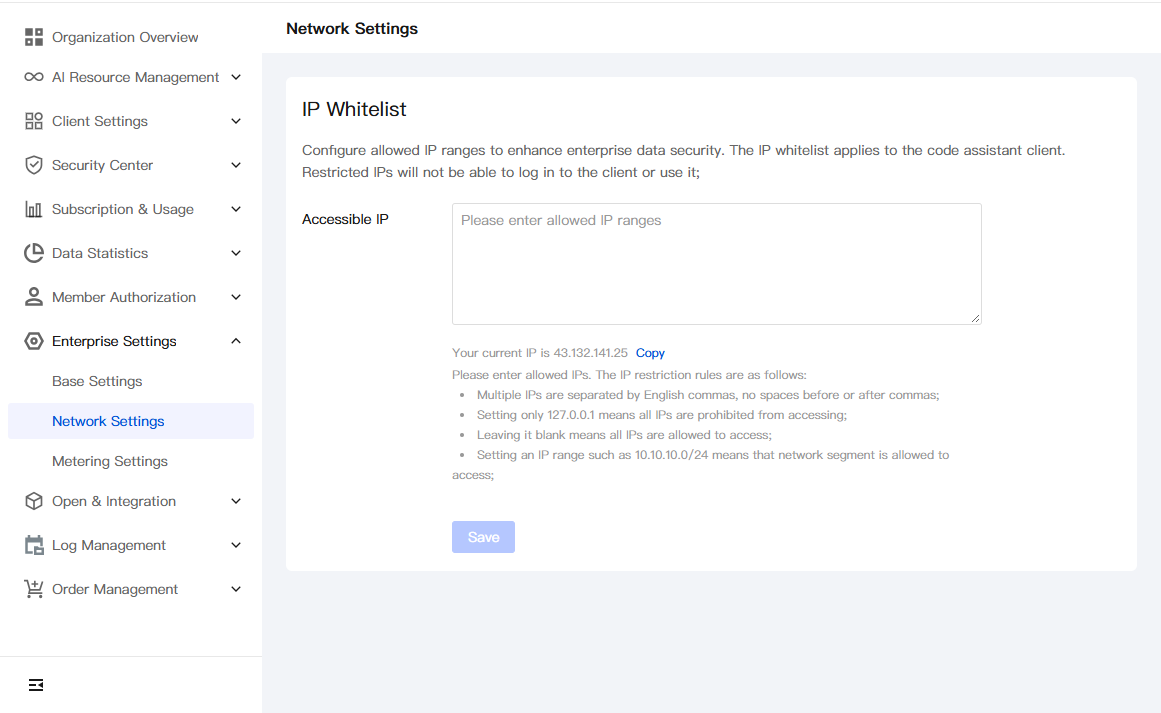
Rules for IP Address Restrictions
Multiple IPs are separated by English commas, no spaces before or after commas;
Setting only 127.0.0.1 means all IPs are prohibited from accessing;
Leaving it blank means all IPs are allowed to access;
Setting an IP range such as 10.10.10.0/24 means that network segment is allowed to access;
Help and Support
Was this page helpful?
You can also Contact sales or Submit a Ticket for help.
Help us improve! Rate your documentation experience in 5 mins.
Feedback