tencent cloud

Database Management Center

Collection Management

Download
Focus Mode
Font Size
Last updated: 2026-05-29 11:26:38
AI-Translated
This document introduces how to create and manage collections, along with related operations.

Prerequisites

Creating a Collection

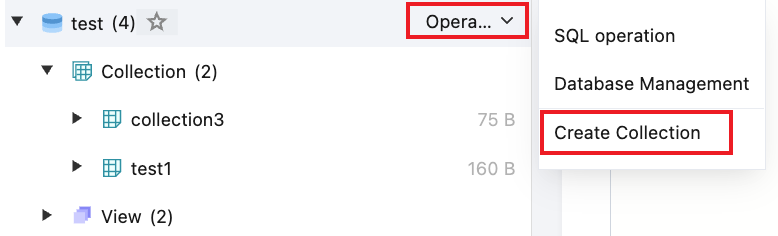
1. In the left database and table panel, hover over the database name and select Operation > Create Collection.

2. In the pop-up dialog box, enter the collection name and click OK.

Collection Management

The SQL window also supports SQL operations and Drop Collection.

Collection SQL Operations

Drop Collection

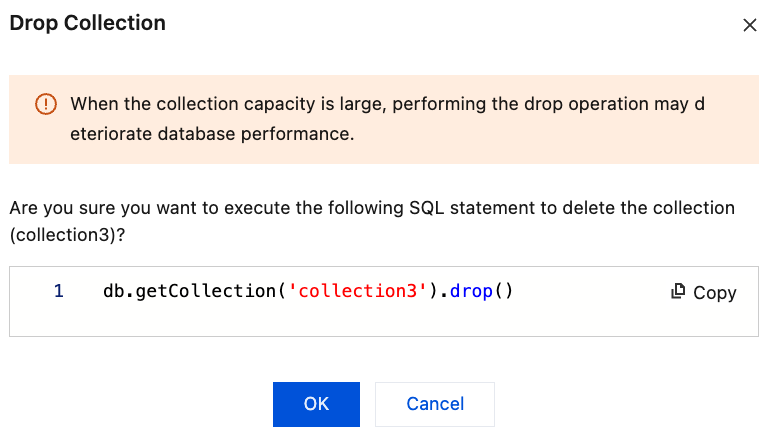
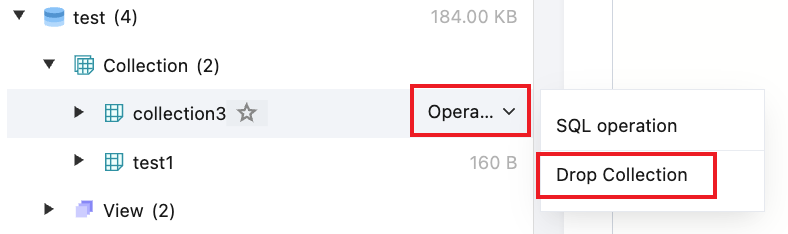
1. When a collection is no longer needed, hover over the collection name in the left database and table panel and select Operation > Drop Collection.

2. In the pop-up window, click OK.


Quick Search for Collections

At the top of the left database and table panel, select Collection, enter the collection name, or select Database.Collection and enter the database name and collection name, and then click
.


Help and Support

Was this page helpful?

Help us improve! Rate your documentation experience in 5 mins.

Feedback