Organizing Usage
Download
Focus Mode
Font Size
Organization Usage displays enterprise usage consumption and quota information by department. It allows administrators to filter departments by cycle or date range, view usage percentages, set total quotas for departments, and export data. It serves as the main entry for controlling department-level usage budgets and reviewing consumption distribution.
Operation Steps
Step 1: Go to the Organization Usage Page
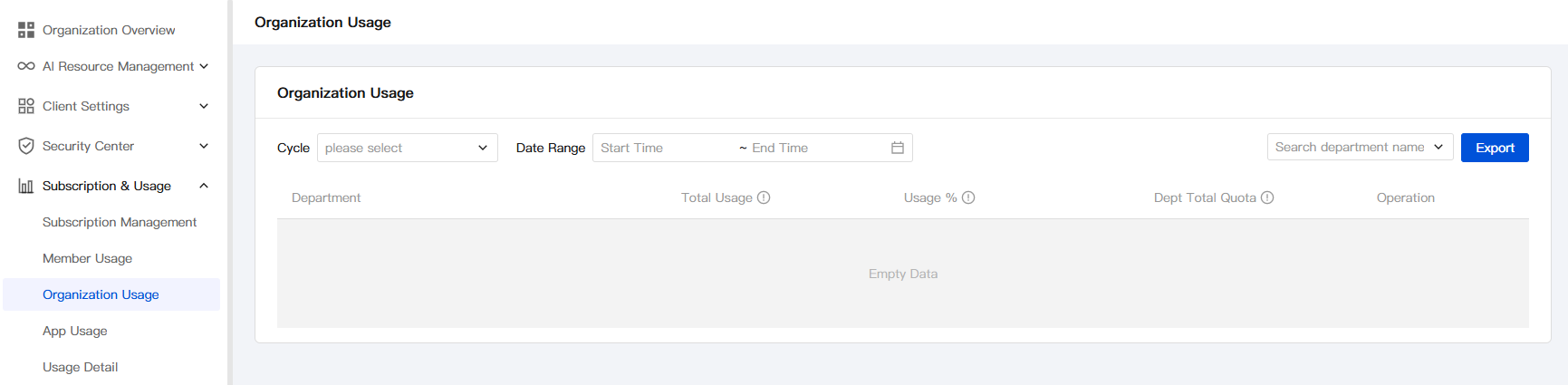
Log in to the WorkBuddy Enterprise admin console, and go to Subscriptions & Usage > Organization Usage in the left sidebar to view the usage list of the current enterprise, which is aggregated by department.
Step 2: Filter by Period or Date Range
Three types of filter conditions are provided at the top of the page and can be used in combination:
Filter | Description |
Period | Select a statistical period from the dropdown list (for example, by month). After the period is selected, the date range is automatically limited. |
Date Range | Customize Start Time - End Time to accurately collect usage statistics for any specified range. |
Search department name | Perform a fuzzy search by department name to quickly locate the target department. |
Step 3: View Department Usage
The following fields are displayed in the list by department:
Field | Description |
Department name | Department name. The data comes from the organizational structure synchronized by OneID. |
Total usage | Total usage consumed by the department within the selected period or date range. |
Usage percentage | Percentage of the department's total usage in the enterprise's total usage. |
Total department quota | Usage limit configured for the department. If not set, it is considered unlimited; if set, interception is triggered when member consumption reaches the limit. |
Operation | Provides operation entries such as Set Department Quota (see step 4 for details). |
Step 4: Set Department Total Quota
Trigger the quota setting entry in the Operation column of the target department row to configure the department total quota for that department. The quota must be a positive integer. If left blank or cleared, it is considered unlimited.
When department quotas are planned, it is recommended to reference the enterprise's total subscription quota and historical usage proportions to reserve a reasonable budget for high-priority departments.
Note:
The department total quota is a cumulative limit: when the total usage of all members in the department reaches this value, new conversation requests will be blocked.
Sub-department quotas are configured independently. When configuring them, administrators must ensure that the sum of sub-department quotas does not exceed the parent department quota to avoid a mismatch between budget and actual consumption.
Step 5: Export Organization Usage Data
Click Export in the upper-right corner of the page to download the organization usage data under the current filter conditions as a file to your local device for offline aggregation, financial reconciliation, or cross-system analysis.
Help and Support
Was this page helpful?
You can also Contact sales or Submit a Ticket for help.
Help us improve! Rate your documentation experience in 5 mins.
Feedback