Expert Management
Download
Focus Mode
Font Size
Expert Management provides enterprises with unified management capabilities for CodeBuddy / WorkBuddy expert resources. With Expert Management, enterprise administrators can upload custom experts, organize category directories, and precisely control member permissions for using experts.
Experts are classified into two sources:
Source | Description |
Enterprise self-built | Custom experts uploaded and maintained by enterprise administrators |
Built-in marketplace | Preset experts provided by the platform, ready to use out of the box. |
Expert List
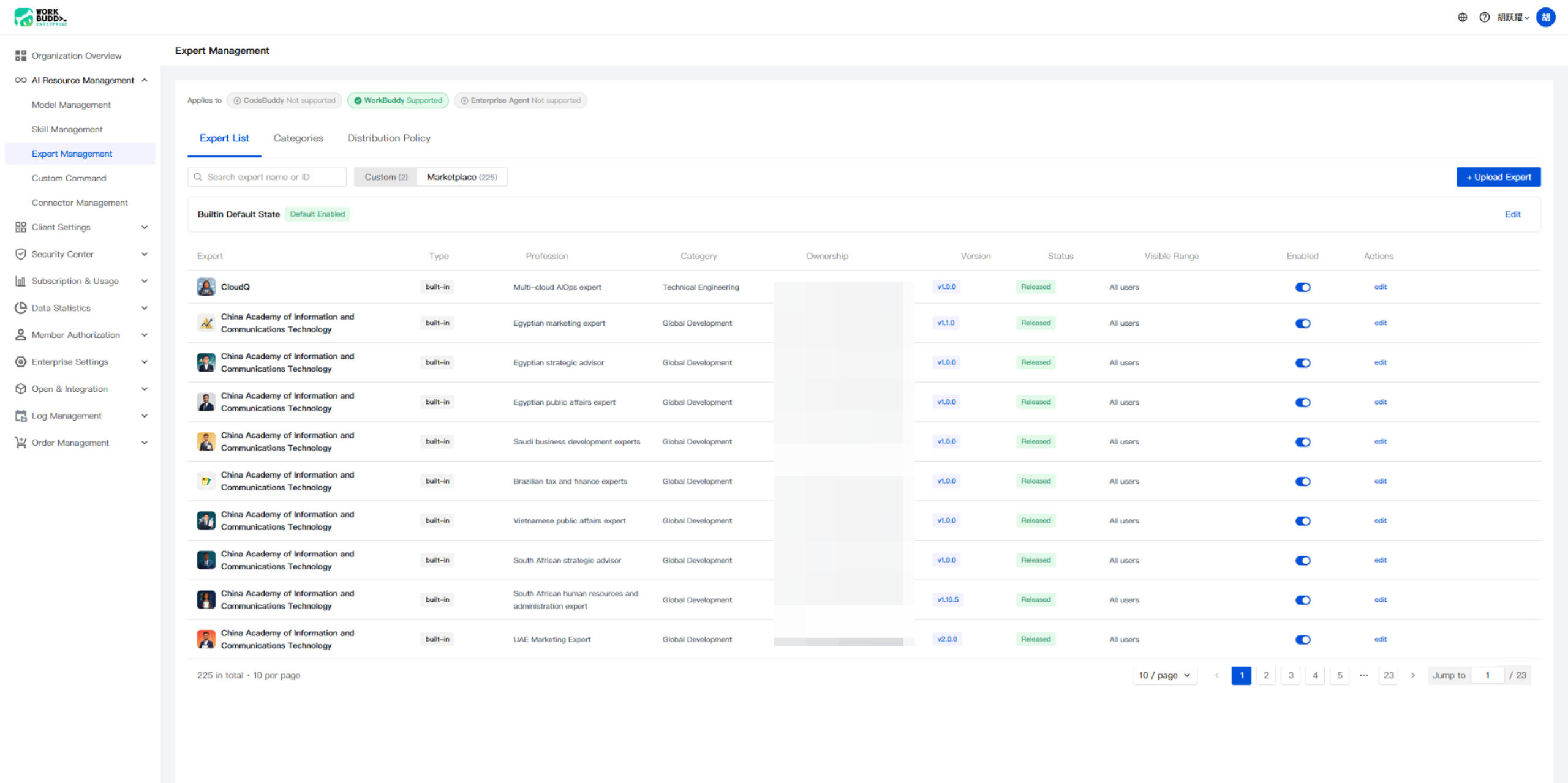
The Expert List serves as the entry point to Expert Management, providing unified viewing and management of all available experts.
Browsing and Searching
Go to Enterprise Management Console and open the AI Resource Management > Expert Management tab to view all experts available to your enterprise. The list displays the following fields:
Field | Description |
Expert | Expert avatar and display name |
Type | Expert source type |
Profession | Expert professional field |
Category | Category of the expert |
Version | Current version number of the expert |
Status | Publish status of the expert |
Visible range | Scope of members within the enterprise who can view this expert |
Enabling log access | Enabled/disabled status of the expert |
You can use the search box at the top to quickly locate an expert by expert name or expert ID.
Uploading Enterprise Experts
Click + Upload Enterprise Expert to enter the expert creation process.
Basic Information Configuration
When creating an expert, you need to provide the following basic information:
Field | Required | Description |
Avatar | No | Supports png / jpg / svg formats, with a recommended size of 200×200 and a file size ≤ 512 KB. If no avatar is uploaded, a default avatar is automatically generated. |
Expert ID | Yes | Globally unique identifier of the expert, in the format of frontend-expert. It cannot be modified after publishing. |
Display Name | Yes | Name displayed for the expert in the interface. |
Category | Yes | Select the category to which the expert belongs for easier organization and search. |
Version | No | Expert version number, defaulting to v1.0. |
Description | No | Describe the purpose of the expert in one sentence, with a maximum of 2000 characters. |
Note:
The expert ID cannot be modified after creation. We recommend using semantic naming, such as
code-reviewer or data-analyst.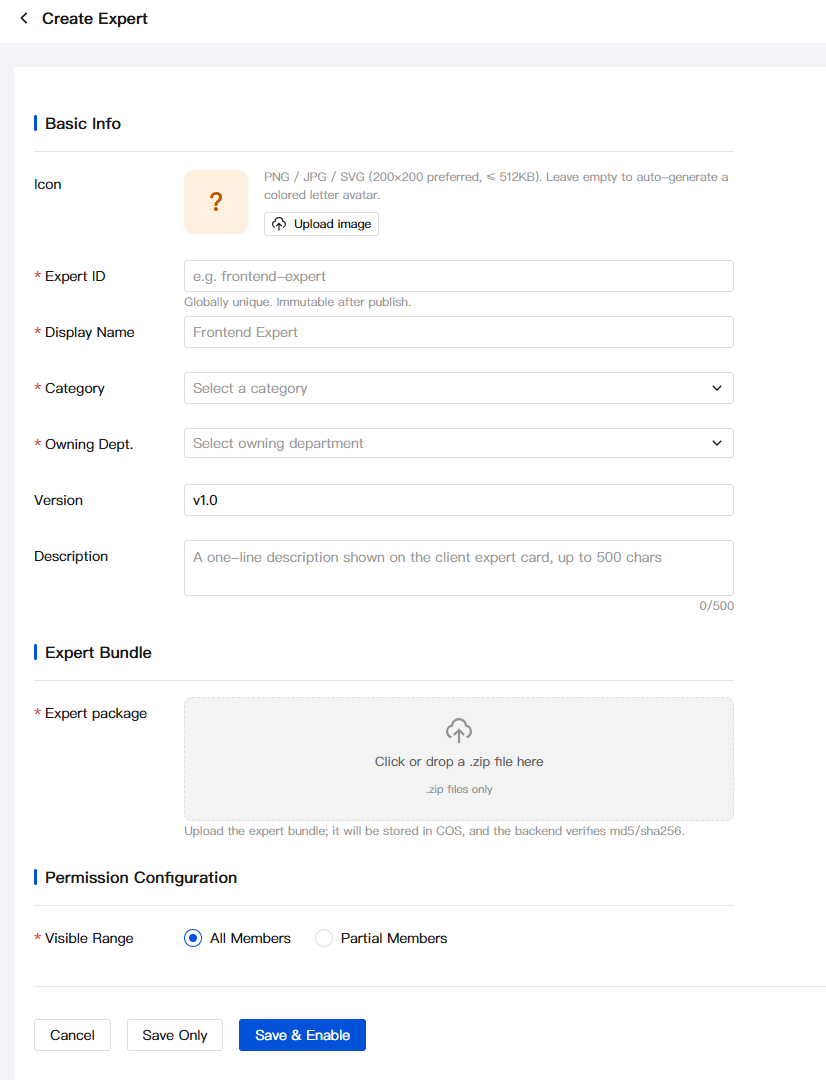
Uploading an Expert Package
An expert package is the core carrier of expert capabilities and is uploaded in
.zip format.Requirements and Restrictions
Only files in
.zip format are supported.After the upload, the system verifies the file integrity using MD5 / SHA256.
The expert package is directly transferred to COS, ensuring security and reliability.
Configuring Permission Scope
Permission configuration determines which members can use this expert:
Option | Description |
All members | All members in the enterprise can use this expert. |
Selected members | Only specified members or departments can use this expert. |
After the configuration is completed:
Click Save Only to save the draft, and the expert remains in the disabled state.
Click Save and Enable to publish the expert immediately, making it available to members.
Category Management
Category management helps you organize experts by domain or purpose, improving the discoverability of enterprise-built experts in the market.
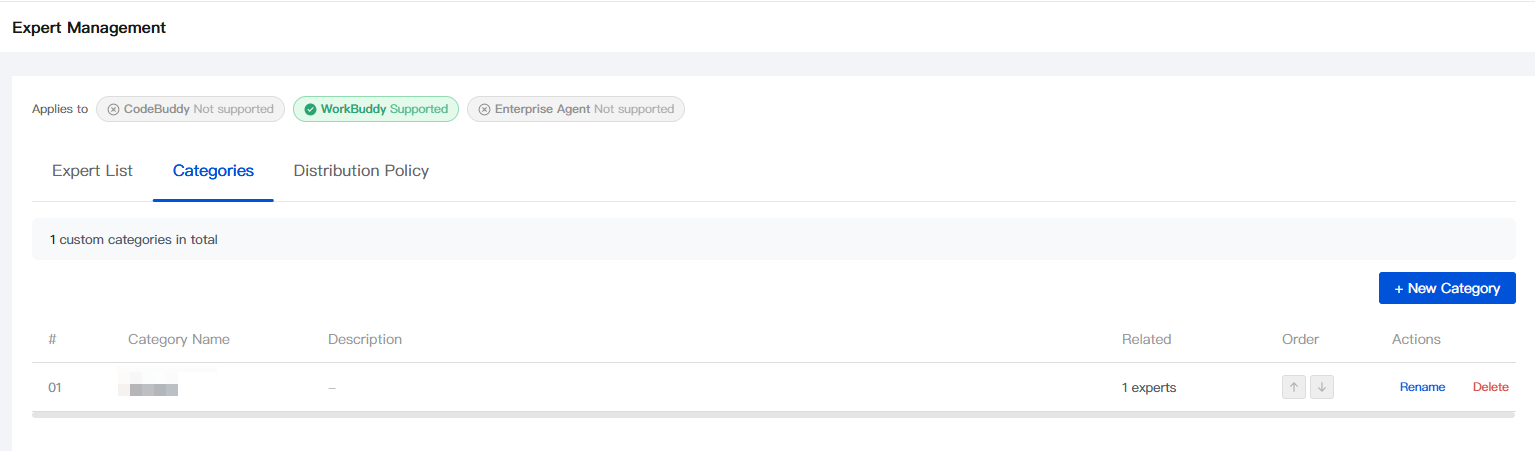
On the Category Management tab, you can view and manage all enterprise-built categories.
Creating a Category
Click the + Add Category button to open the creation dialog:
Field | Required | Description |
Classification Name | Required | Display name of the category in the Enterprise Market client. It is recommended to keep it short and clear, with a maximum of 20 characters. |
Category Description | No | Internal remarks visible only to enterprise administrators, used to identify the purpose of the category, with a maximum of 500 characters. |
Sort Position | Required | Select Append to the end or Pin to the top to determine the display order of categories in the Enterprise Market. |
Managing Existing Categories
The category list displays the following information:
Field | Description |
# | Category No. |
Classification Name | Display name of the category. |
Category Description | Internal remarks description. |
Associated | Number of experts associated with this category. |
Sort | Current sort position. |
Operation | Rename and delete operations. |
Expert Delivery Policy
The expert distribution policy allows you to finely control member access permissions to experts, enabling differentiated permission management.
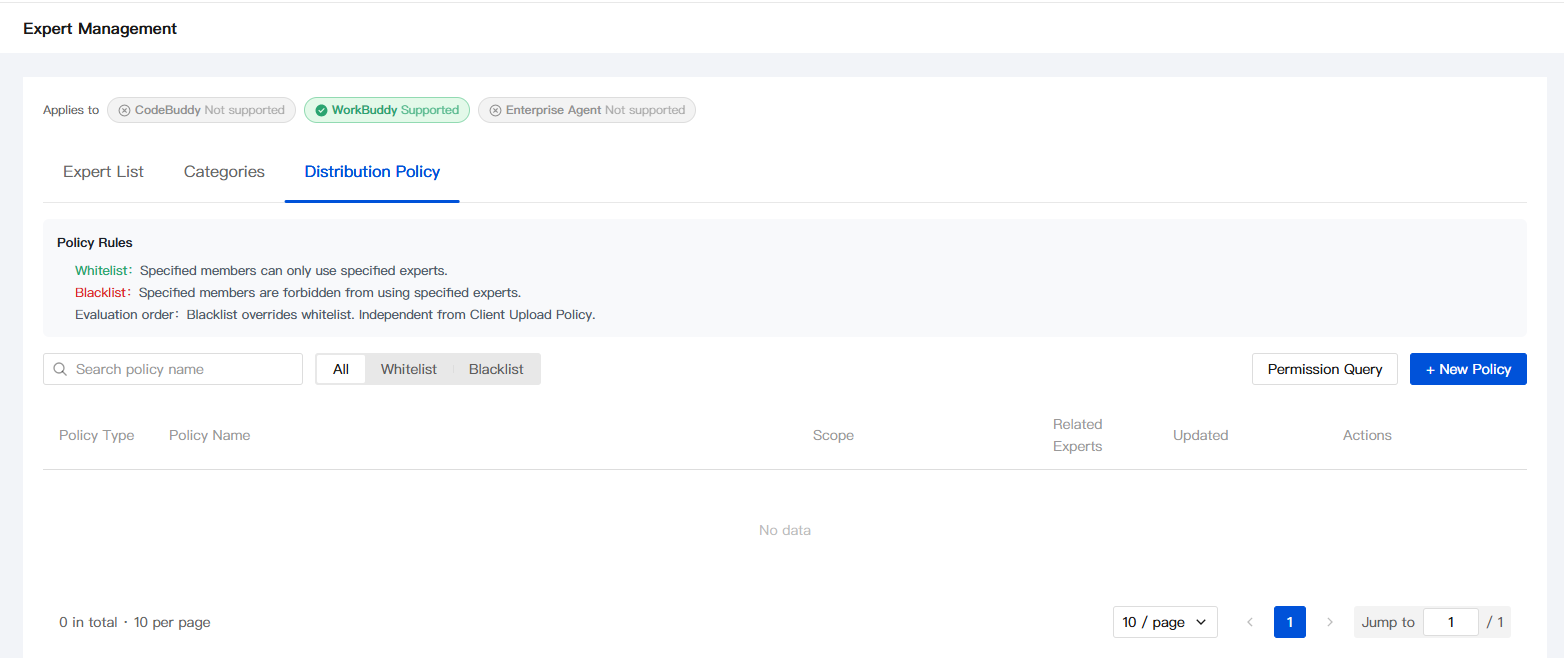
On the Expert Distribution Policy tab, you can create and manage permission policies.
Policy type
The system supports two types of policies:
Policy Type | Effect | Scenario |
Allowlist | Only allow specified members to use the target expert. | Open sensitive experts to specific teams. |
Blocklist | Prohibit specified members from using the target expert. | Restrict certain roles from accessing specific resources. |
Priority rules: When both allowlist and blocklist policies exist for the same expert, the blocklist takes precedence over the allowlist. This means that users blocked by the blocklist cannot gain access through the allowlist.
Creating a Policy
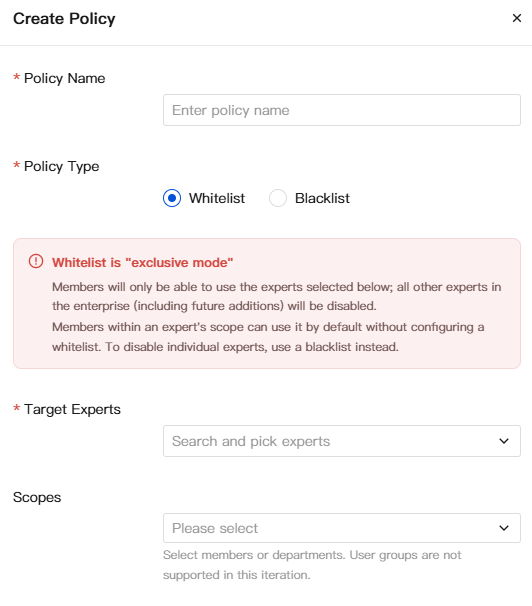
Click the + Create Policy button and configure the following parameters:
Field | Required | Description |
Policy Name | Yes | Unique identifier name of the policy. |
Policy Type | Yes | Select allowlist or blocklist. |
Target Expert | Yes | Select the experts to which this policy applies. Multiple selections are supported. |
Scope of Effect | Yes | Select the members or departments to which the policy applies. |
Query and Management
The policy list provides the following filtering and query capabilities:
Search by policy name.
Filter by policy type (All / Allowlist / Blocklist).
View information such as Scope, Associated Experts, and Modification Time.
Quickly view a member's final access permissions for an expert through Permission Query.
Query the scope and target experts of a policy during operations. You can also edit the policy configuration.
Notes and Considerations
Information Collection and Use
Collection Item | Required | Purpose |
Enterprise account information (login credentials) | Yes | Log in to the enterprise management console to upload, configure, and manage experts. |
Expert package file content (instructions, tool definitions, and domain knowledge) | Yes | Build the core capabilities and behavior patterns of enterprise experts. |
Expert ID (globally unique ID) | Yes | Used for internal system references and client calls, and cannot be modified after creation. |
Category Name and Sorting Configuration | Yes | Organize the display structure of experts in the enterprise marketplace to improve discoverability. |
Distribution policy configuration (member/department selection) | Yes | Precisely control access and usage permissions of different members to experts. |
Avatar file (optional) | No | Uploaded only when an administrator actively configures an avatar for an expert. |
Type determination criteria:
Required: Information that must be provided when enterprise experts are created and managed, such as enterprise account, expert package, identifier, category, and permission configuration.
Optional: Data that is involved only when the administrator proactively accesses optional features, such as expert avatars.
Permission Boundaries
The visibility scope of enterprise-created experts is set by the administrator at the time of creation. You can select All Members or Selected Members.
Built-in marketplace experts are provided by the platform and are ready to use out of the box. They are not subject to enterprise-issued policies.
The blocklist takes precedence over the allowlist. When the same member matches both policies, the blocklist applies.
The enable/disable status of an expert is independent of issued policies. Once an expert is disabled, it becomes unavailable to all members.
Security Tips
The expert ID cannot be modified after creation. We recommend using semantic naming, such as
code-reviewer or data-analyst, and avoiding temporary or ambiguous IDs.We recommend configuring an allowlist policy for experts involved in sensitive data or high-risk operations to restrict their usage scope.
Disable or delete experts that are no longer in use in a timely manner, and clean up the associated issued policies.
Points Consumption Reminder
Browsing, uploading, and managing experts do not consume credits. When members use experts for conversations in the client, the client consumes credits based on the task volume and model calls.
Third-Party Sharing
The content and capabilities of enterprise-created experts are managed and controlled by the enterprise and are not shared with third parties outside the platform.
Built-in marketplace experts are provided and maintained by the platform and follow the platform's data management policies.
The external service call capability of an expert depends on the configuration within the expert package and is outside the scope of enterprise management.
Disclaimer
The uploader is responsible for the accuracy, security, and compliance of enterprise-created expert content. The client assumes no legal or technical liability for expert behavior output.
Built-in marketplace experts are maintained by the platform, and the timeliness and accuracy of their content depend on the platform's update policy.
The output of experts in conversations is for reference only. For critical decisions, verify them based on actual business conditions.
Usage Recommendations
The expert ID cannot be modified after creation. Confirm the naming conventions and keep records before creation to ensure naming consistency within the team.
After the issued policy is configured, we recommend using the "Permission Query" feature to verify the results and ensure that the target members are consistent with the expected allowlist/blocklist configuration.
Regularly check the display status of enabled experts and the enterprise marketplace, promptly remove expired or low-utilization experts, and keep the enterprise marketplace clean and efficient.
Declaration
The content of this section constitutes an integral part of the Service Agreement and the Privacy Protection guidelines and has the same legal effect. In case of any inconsistency, the original text of the aforementioned agreements shall prevail.
Help and Support
Was this page helpful?
You can also Contact sales or Submit a Ticket for help.
Help us improve! Rate your documentation experience in 5 mins.
Feedback