Conversion from Pay-As-You-Go to Yearly/Monthly Subscription
Unduh
Mode fokus
Ukuran font
Scenario Description
Tencent Cloud Native Intelligent Gateway supports billing mode conversion, providing the capability to switch from pay-as-you-go to yearly/monthly subscription, enabling you to purchase and use the engine flexibly. This document describes the feature for converting a pay-as-you-go instance to a yearly/monthly subscription instance in the Tencent Microservices Platform console.
Note:
Converting from pay-as-you-go to yearly/monthly subscription typically does not involve rebuilding or migrating instance resources and generally does not affect your business access. To ensure business stability, we recommend that you perform this operation during off-peak hours and make appropriate observations and preparations.
Conversion Rule
After a conversion from pay-as-you-go to yearly/monthly subscription is performed, a yearly/monthly subscription engine instance cannot be converted back to a pay-as-you-go instance. Please confirm carefully to avoid unnecessary costs.
For an introduction to yearly/monthly subscription billing, see Billing Overview.
Operation Steps
1. Log in to the Tencent Microservices Platform console, select Cloud Native Intelligent Gateway in the left sidebar, locate the target instance in the instance list, and choose More > Convert from Pay-as-you-go to Yearly/Monthly Subscription in the Operation column.
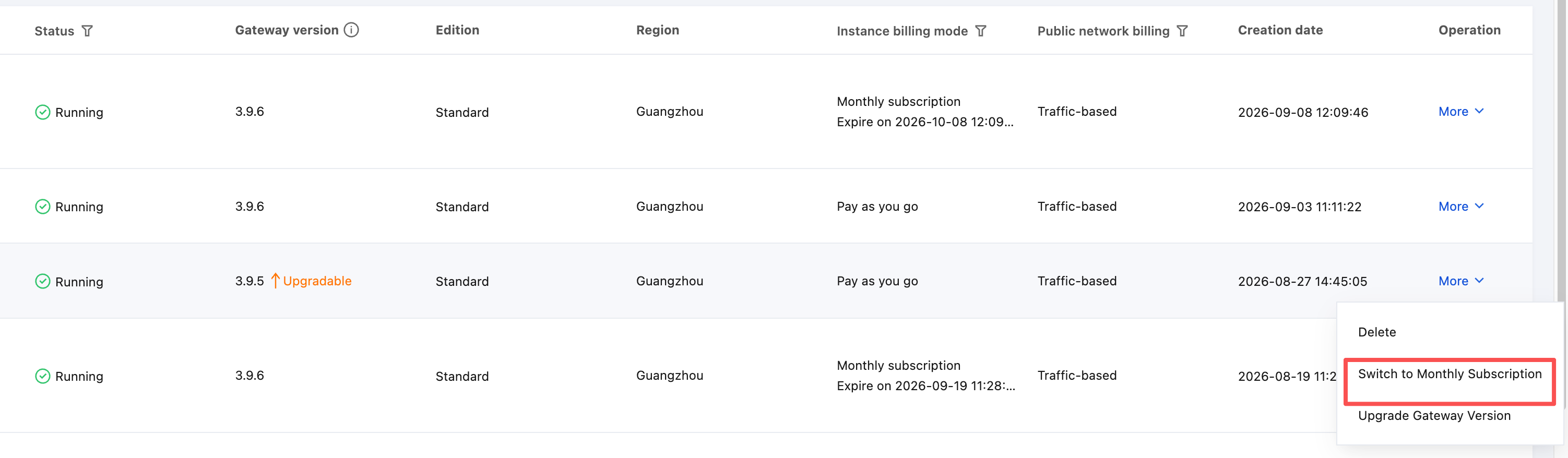
2. In the pop-up dialog box, select the renewal duration, select the agreement rules, and click Confirm.
Note:
To enable automatic renewal after expiration to avoid service interruption, you can select Auto-renewal in the dialog box (it is not selected by default, and whether to enable it is entirely up to you). After it is enabled, the system will automatically deduct fees and renew the instance before its expiration according to the agreed cycle. You can modify or disable it at any time on the Renewal Management page. For details about renewal rules, see Auto-renewal Instructions.
Bantuan dan Dukungan
Apakah halaman ini membantu?
Anda juga dapat Menghubungi Penjualan atau Mengirimkan Tiket untuk meminta bantuan.
masukan