Circuit Breaker Policy
Unduh
Mode fokus
Ukuran font
Scenarios
When a backend Tool (Tool) accessed by the MCP Gateway experiences a persistent failure (such as consistently slow responses, persistent error returns, or sustained rate limiting by a third-party API), using the ordinary "call retry" mechanism can instead amplify invalid requests and degrade overall performance. To address this, the MCP Gateway provides Tool circuit breaking and degradation capabilities. When persistent failures from a Tool's backend reach a configured threshold, the gateway automatically "circuit breaks" that Tool. This causes subsequent requests to fail fast and return a degraded response, preventing them from being sent to the already faulty backend. After the backend recovers, the gateway automatically probes and restores normal calls. Each Tool has an independent circuit breaker, so a failure in one Tool does not affect other Tools under the same service. This document describes how to configure circuit breaking and degradation policies for an MCP Tool in the console.
Prerequisites
The AI Gateway (MCP Gateway) instance has been created.
The HTTP-to-MCP Service has been created and the Tool configuration has been completed.
How Circuit Breaker Works
A circuit breaker has three states and automatically switches between them without manual intervention:
Status | Description |
Closed (Normal) | Requests are forwarded to the backend normally, and the error rate/slow call rate is continuously counted. |
Open (Circuit Breaking) | After a circuit breaker is triggered, all requests are immediately returned with degraded responses and are no longer forwarded to the backend. After a period of time, the circuit breaker goes to the half-open state. |
Half-Open (Probing) | A small number of probe requests are allowed to pass to the backend. If the number of successful probes reaches the threshold, the circuit breaker is restored to the closed state. If a probe fails, the circuit breaker is triggered again. |
Operation Steps
Step 1: Go to Tool Circuit Breaker Policy Configuration
1. Log in to the Microservices Platform console. In the left sidebar, select AI Gateway to go to the instance list.
2. On the instance list page, click the ID of the gateway instance you want to configure to go to its basic information page.
3. Select MCP Management, locate the target HTTP-to-MCP Service, and go to its Tool list.
4. Click the target Tool to go to the Tool Details page, select the Policy Configuration tab, and locate the Circuit Breaking Policy section.
Step 2: Enable and Configure the Circuit Breaker Policy
1. Open Circuit Breaking Policy to expand the configuration form.
2. Configure the circuit breaking trigger conditions (the following two types of conditions can be enabled individually or simultaneously, with at least one enabled. Circuit breaking is triggered when any condition is met):
Basic Statistics Settings
Configuration Item | Default Value | Value Range | Description |
Statistical Duration | 10 seconds | 1 to 60 seconds | Sliding time window for error rate / slow call rate statistics |
Minimum request count | 10 times | 1 to 100 times | The circuit breaker is not triggered when the number of requests within the window is insufficient, preventing false positives due to low traffic. |
Error Ratio Trigger (enabled by default)
Configuration Item | Default Value | Value Range | Description |
Trigger status codes | 500,502,503,504 | 400 to 599, up to 32 | Which HTTP status codes are counted as errors (for example, 429 can be added as needed). |
Error rate threshold | 50% | 1~100 | Circuit breaking is triggered when the error rate reaches this threshold. |
Slow Call Trigger (disabled by default)
Configuration Item | Default Value | Value Range | Description |
Maximum response time | 3000 ms | 100~60000 ms | A call that exceeds this duration is considered a "slow call". This value must be less than the request timeout of the backend service, otherwise slow calls cannot be counted. |
Slow call ratio threshold | 80% | 1~100 | Circuit breaking is triggered when the slow call rate reaches this threshold. |
3. Configure Circuit Breaker Recovery Behavior:
Configuration Item | Default Value | Value Range | Description |
Circuit Breaker Duration | 30 seconds | 5 to 600 seconds | After the circuit breaker is opened, it remains in this state for the configured duration. After the duration expires, it goes to the half-open state for probing. |
Number of Probing Requests in Half-Open State | 3 | 1 to 10 | Number of Probing Requests Allowed to Pass to the Backend in Half-Open State |
Success Threshold in Half-Open State | 2 | 1 to the number of probing requests | If the number of successful probes reaches this threshold, the circuit breaker is restored to the normal (closed) state. |
Skip Retry During Circuit Breaking | Enable | On / Off | Keep this option enabled. During a circuit breaker, retries for this Tool are skipped to avoid invalid loops. |
4. Configure Fallback Policy (the content returned to the caller during circuit breaking):
Degradation Policy | Default Return Code | Returned Content | Applicable Scenarios |
No degradation | 503 | Standard error message (Circuit breaker open) | The caller (Agent) can identify errors and handle them independently, and does not require a "false success" response. |
Fixed JSON response | 200 | Returns the fixed JSON content you preset. | The caller can accept empty results or fallback prompts and does not require real data. |
5. After confirming that the configuration is correct, click Submit.
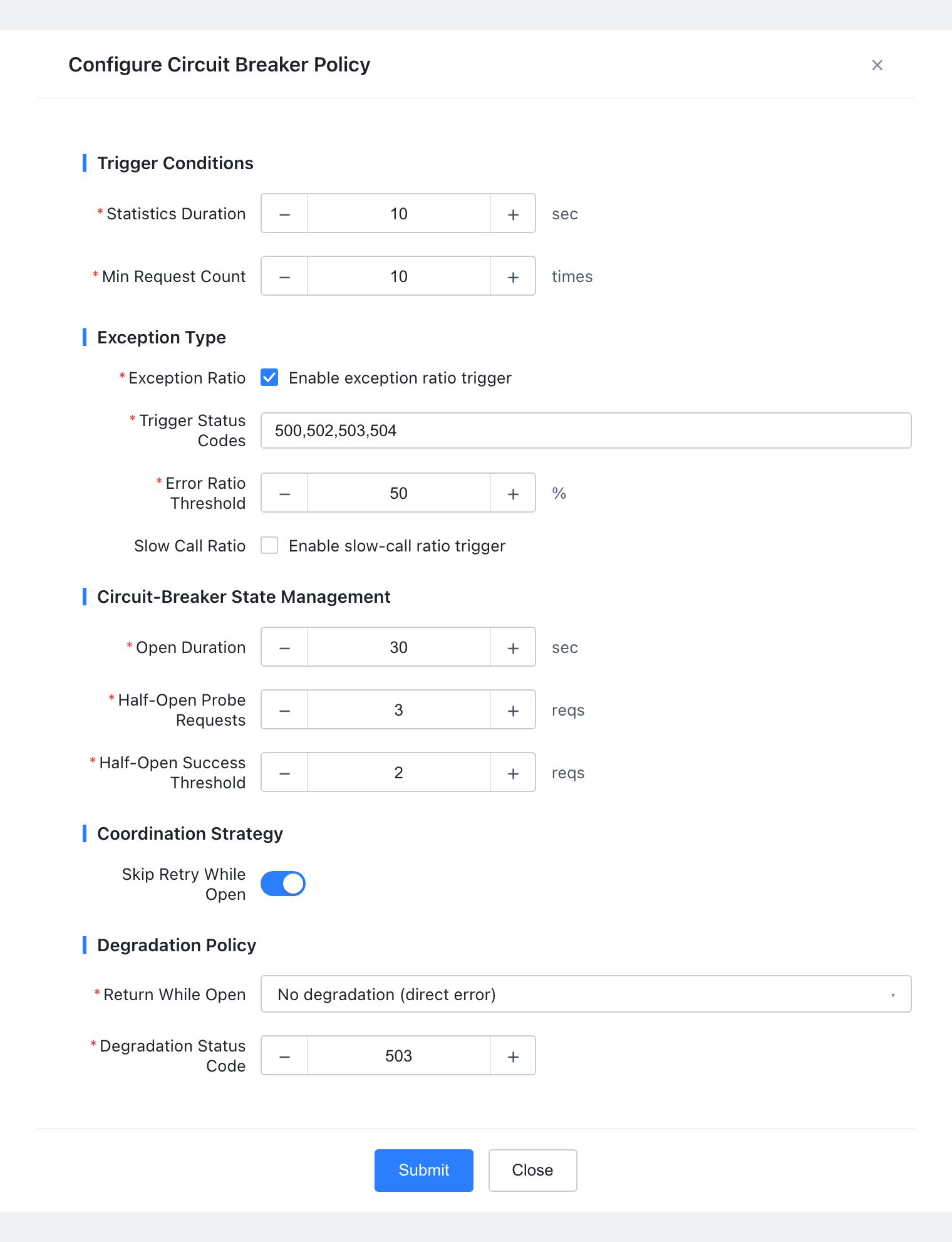
Step 3: View and Modify
View Enabled Configuration: After you enable it, the circuit breaking policy area displays "Enabled" and the current configuration summary (trigger conditions, statistical window, circuit breaking duration, fallback policy, and so on). You can click Edit to modify it.
Modify Configuration: After adjusting the parameters, save the changes. The configuration takes effect within approximately 5 seconds.
Disable Circuit Breaking: Turn off the Circuit Breaking Policy switch and save the change. The Tool immediately resumes normal forwarding (without circuit breaking).
Application Scenarios
Scenario | Symptom | Recommended Configuration |
Backend persistently slows down. | Backend tool response time degrades from milliseconds to seconds, and retries cause a large accumulation of requests. | Enable "slow call triggering" (maximum response time: 3000ms, ratio: 80%), and return a fixed JSON response upon degradation. |
Backend persistently reports errors. | The backend dependency fault continuously returns 5xx, and retries amplify invalid requests. | Enable "error ratio triggering" (status codes: 500/502/503/504, threshold: 50%), and keep "skip retries during circuit breaker" enabled. |
Third-party API Rate Limiting | The third-party API continuously returns 429, and the Agent falls into an invalid call loop. | Add 429 to the "trigger status codes", enable error ratio triggering, and return a fixed JSON response as a fallback upon degradation. |
Related Instructions
Circuit breaking and fallback are disabled by default. They take effect only after being enabled and do not affect the existing behavior of current Tools.
The circuit breaker for each Tool is independent and does not affect others.
It is recommended to use circuit breaking in conjunction with "Tool Call Retry" and keep "Skip Retry During Circuit Breaking" enabled to achieve optimal fault tolerance.
Bantuan dan Dukungan
Apakah halaman ini membantu?
Anda juga dapat Menghubungi Penjualan atau Mengirimkan Tiket untuk meminta bantuan.
masukan